One thread per contact across email, SMS, Facebook, Instagram, web chat and calls
A person keeps one conversation, whichever channel they use. Email, text, Facebook, Instagram, web chat and calls sit in that thread, in the order they happened.
MODULE 02 / COMMUNICATE
Email, SMS, Facebook, Instagram, web chat and calls land in one thread per contact. Reply on the channel they used, assign the conversation, and watch it update live. The unified inbox is included in RevGrow, and each client account runs it under your brand.
Join the waitlist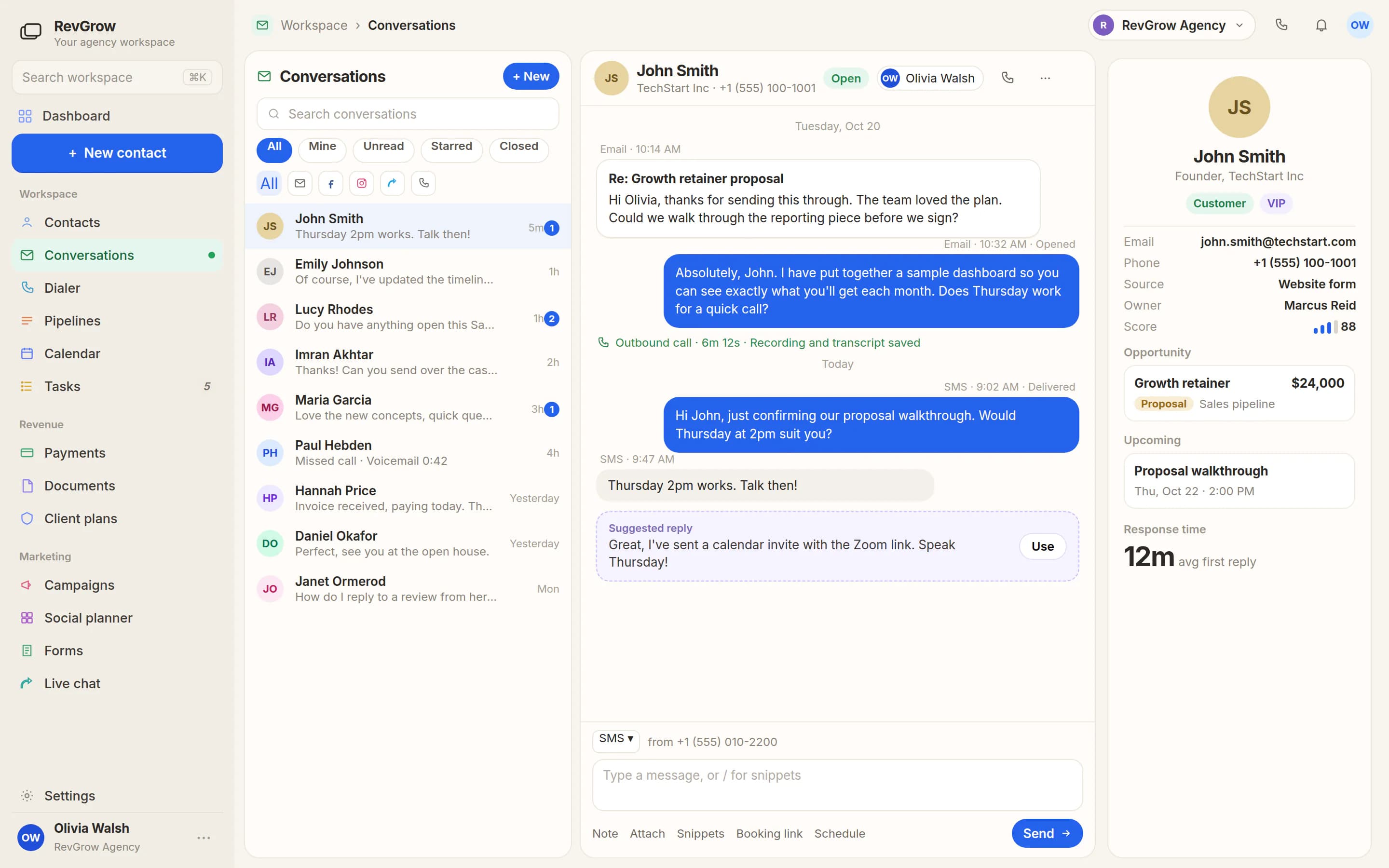
WHAT IT DOES
A person keeps one conversation, whichever channel they use. Email, text, Facebook, Instagram, web chat and calls sit in that thread, in the order they happened.
A new reply appears for everyone who has the conversation open. The list, the thread and the unread count stay current without a reload.
Answer on the channel the contact used, or switch. The composer shows the channel and the number or account you are sending from before the message goes out.
Someone who has opted out is not sent another text or email from the composer. A message that cannot send says why in the thread.
The assignee gets a push on desktop or mobile when a new message lands. The inbox does not have to stay open for the team to know.
Type / to insert a snippet, or open Snippets from the composer. Email can be rich text, so a proposal reply is not limited to plain text.
A suggested reply can sit in the thread for you to use or ignore. AI can draft that line, and the conversation still hands off to a person on the team.
Each conversation has a status and an assignee. Filter to yours, the unread, the starred or the closed, and read the average first reply beside the contact.
Schedule a message for later, search the list by name or by the words in a thread, and merge conversations that belong to the same contact.
An email shows when it was opened. Clicks on a link in the message are tracked too, so you can see whether the proposal was read before you follow up.
A CLOSER LOOK
All, Mine, Unread, Starred and Closed sit above the conversations, with a row of channel icons under them. Search by name, and an unread count marks the threads that still need a reply.
Email keeps its subject and an opened mark. A text shows delivered. A call stays in the same thread, with the length and a note that the recording and transcript were saved.
Tags, email, phone, source, owner and score stay in view. The open opportunity, the next appointment and the average first reply sit on that same panel.
The composer takes a note, an attachment, a snippet, a booking link or a scheduled send. A suggested reply offers a line you can use, then the message still goes out from you.
HOW IT WORKS
Connect email, including Gmail or Outlook, plus texting, Facebook, Instagram and web chat. Calls from the dialer land in the same thread.
Open Conversations and filter to unread, yours, starred or closed. Pick a channel icon when you only want one kind of message.
Answer on the channel they used, or switch in the composer. Add a snippet, a booking link or an attachment, or schedule the send.
Set the status and the assignee. The contact, the opportunity and the upcoming appointment stay beside the thread, so the handoff has the context.
FOR AGENCIES
The unified inbox is one module in the CRM you white-label. Each client account has its own conversations. You set the channels, the team and the brand.
Messages, calls and history stay inside that client's account. One inbox never appears in the next client's workspace.
Connect the providers on accounts you own, then share them with a client or let that client bring their own. Snippets and assignment stay with the team that works the inbox.
Logo, colors, fonts and domains are yours. Clients work in your platform, including the inbox they check every day.
The unified inbox ships with the other modules. It is not a paid add-on, and there is no per-seat fee to put the team on it.
Already keeping conversations in another CRM? We move them for you, free, or you bring them across yourself. Keep the old tool running until you are ready.
The thread stays current. The brand stays yours.
THE REST OF THE PLATFORM
One database for every client, with custom fields, tags, smart lists and clean CSV import and export.
Explore ↗Browser dialer, click to call, recordings, transcripts and outcome tracking.
Explore ↗A branded chat bubble for any client site that lands in the same inbox.
Explore ↗FAQ
Email, SMS, Facebook, Instagram, web chat and calls share one thread per contact. Gmail and Outlook connect as email. Messenger connects with Facebook. A call, including a missed call or a saved recording, stays in that same conversation.
Yes. The composer opens on the channel of the conversation, and you can switch before you send. It shows the account or number the message will come from, such as the texting number on an SMS.
Each conversation has a status, such as Open, and an assignee. Filter the list to All, Mine, Unread, Starred or Closed. The contact panel shows the average time to the first reply, so the team can see how fast the inbox is being worked.
Write the message, or type / to insert a snippet. You can also add a note, an attachment, a booking link, or schedule the send. Email can be rich text. A suggested reply can be used as the starting line.
No. A suggested reply is there to use or ignore, and an AI reply hands the conversation to a person. The assignee, the status and the thread stay with the team.
A text can show Delivered, and an email can show Opened. Link clicks are tracked as well. New messages appear in the open thread without a refresh, and a message that cannot send says why in the timeline.
Yes. The unified inbox is part of the platform you white-label. Your name, logo, colors, fonts and domains are what clients see, and their conversations stay in their own account. It is included in the one-time licence, with no extra fee to turn it on and no per-seat charge.
Yes. We move conversations for you, free, along with contacts, pipelines, workflows and calendars. Email hamid@revgrow.app with the tool you use today. Keep your current CRM running until you are ready.
YOUR NEXT CHAPTER STARTS HERE
Join the waitlist and lock in the $799 one-time founding price. Pay once, own the code, run every client under your brand.
Founding price for the first 50 only