Google Business Profile review sync
Connect Google Business Profile and bring reviews into RevGrow. The sync status stays in view above the dashboard, while the review list keeps the reviewer, rating, date and response status together.
MODULE 13 / GROW
Bring Google reviews into the CRM, send review requests and reply from the same screen. Track ratings, requests and responses across locations, then share reviews through an embeddable widget. Reputation and reviews is included in RevGrow, and each client account runs it under your brand.
Join the waitlist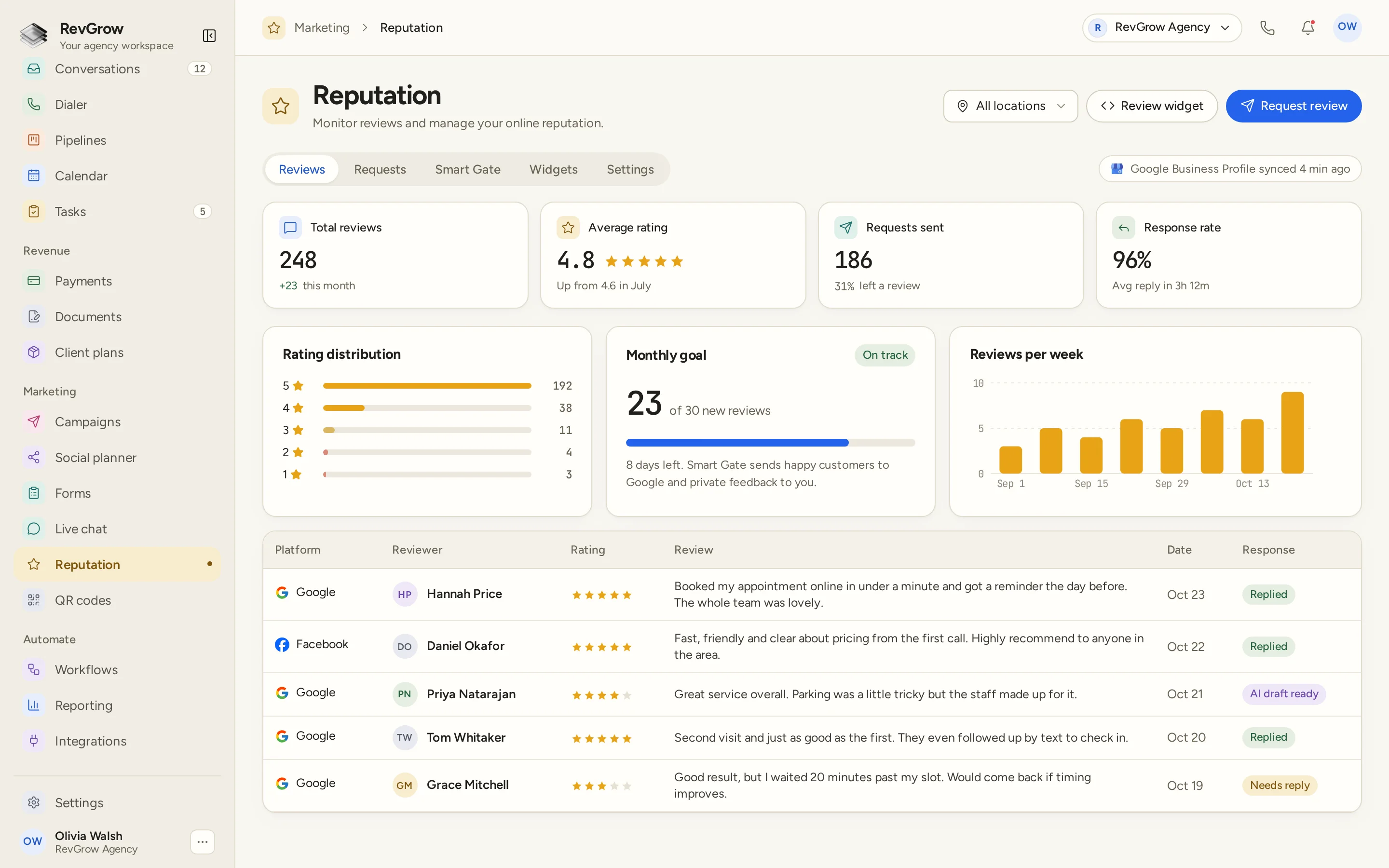
WHAT IT DOES
Connect Google Business Profile and bring reviews into RevGrow. The sync status stays in view above the dashboard, while the review list keeps the reviewer, rating, date and response status together.
Send review requests automatically as part of the client's review process. Track requests sent beside the share that led to a review, and return to the Requests area to manage that work.
Write a reply from the CRM and post it back to Google. Keep the review and its response status on the same row, so the team can see which reviews still need attention.
Put a review widget on a website with an embed. Manage widgets alongside reviews and requests, so the website display has a place in the same reputation workspace.
Review total reviews, average rating, requests sent and response rate together. Rating distribution, a monthly goal and reviews per week give the team more detail for its next review of the account.
Manage reviews across locations. Use the location selector to focus the work on one location or review the broader picture from the same dashboard.
A CLOSER LOOK
All locations sits beside Review widget and Request review in the header. A Google Business Profile sync status appears below, next to the Reviews, Requests, Smart Gate, Widgets and Settings tabs.
Total reviews, average rating, requests sent and response rate sit across the top. Supporting details show recent review activity, the share of requests that led to a review and average reply time. These figures belong to the sample dashboard.
Rating distribution separates the reviews by star rating. A monthly goal shows progress through the period, and the weekly chart shows how many reviews arrived over time.
The table keeps platform, reviewer, rating, review, date and response together. Replied, AI draft ready and Needs reply appear as statuses in the sample, so the next piece of reply work is visible beside the review.
HOW IT WORKS
Connect Google Business Profile for the client and choose the location you want to work on. Check the sync status before reviewing the list.
Configure automated review requests for the client's process. Keep request activity in the same workspace as the reviews it brings back.
Open the reviews that need attention, write the response in the CRM and post it back to Google. Use the response status to keep track of the work.
Check the rating mix, request activity, response rate and monthly goal. Add an embeddable review widget to the website when you want reviews displayed there.
FOR AGENCIES
Reputation and reviews is one module in the CRM you white-label. Each client account has its own review work, with location views for businesses that operate in more than one place. You set the review process and the brand.
Reviews, requests and reputation work stay inside that client account. One client's review process stays separate from the next client's workspace.
Use the location selector when the business has more than one location. Keep the location in view while the team works through review activity and replies.
Logo, colors, fonts and domains are yours. Clients manage review requests, replies and dashboard activity inside your platform.
Reputation and reviews ships with the other modules. The dashboard, request process and replies sit in the same platform the team uses for its CRM work.
Already working from another CRM? Free migration covers contacts, pipelines, workflows, calendars, conversations and the rest. Email hamid@revgrow.app with the tool you use today. Keep the old tool running until you are ready.
The review work stays connected. The brand stays yours.
THE REST OF THE PLATFORM
One database for every client, with custom fields, tags, smart lists and clean CSV import and export.
Explore ↗Visual builder with triggers, branches, waits, webhooks and AI steps.
Explore ↗Per-client and agency-wide dashboards for pipeline, revenue, calls, ads and SEO.
Explore ↗FAQ
Yes. Connect Google Business Profile to sync reviews into RevGrow. The dashboard shows the sync status, and the review list keeps the reviewer, rating, review date and response status together.
Yes. Automated review requests are included. Set up the request process for the client and track requests sent alongside the share that led to a review.
Yes. Write a reply from the CRM and post it back to Google. Response statuses stay beside the review, helping the team see which reviews have a reply and which still need attention.
Yes. Reputation includes an embeddable review widget. Manage it from the reputation workspace, then use the embed to display the widget on the website.
The dashboard brings together total reviews, average rating, requests sent and response rate. It also shows rating distribution, monthly goal progress and reviews per week. The figures and review rows in the screenshot are sample data.
Yes. Multi-location support lets you use the location selector to focus on a location or review the broader picture. The selected location stays in view above the dashboard.
Yes. Reputation and reviews is included with the other modules under your name, logo, colors, fonts and domains. Each client account keeps its own review work, and clients manage it inside your platform.
Yes. Free migration covers contacts, pipelines, workflows, calendars, conversations and the rest. Email hamid@revgrow.app with the tool you use today so we can review the setup with you. Keep your current CRM running until you are ready to switch.
YOUR NEXT CHAPTER STARTS HERE
Join the waitlist and lock in the $799 one-time founding price. Pay once, own the code, run every client under your brand.
Founding price for the first 50 only