Block-based document builder
Put a proposal or contract together from blocks for text, pricing tables and signature fields. Rearrange them until the document reads the way you want.
MODULE 10 / GET PAID
Build proposals and contracts from templates that fill in the client's details for you. Send them for signature in the right order, take payment when they sign, and keep a full audit trail with the contact. Documents and e-sign is included in RevGrow, and each client account runs it under your brand.
Join the waitlist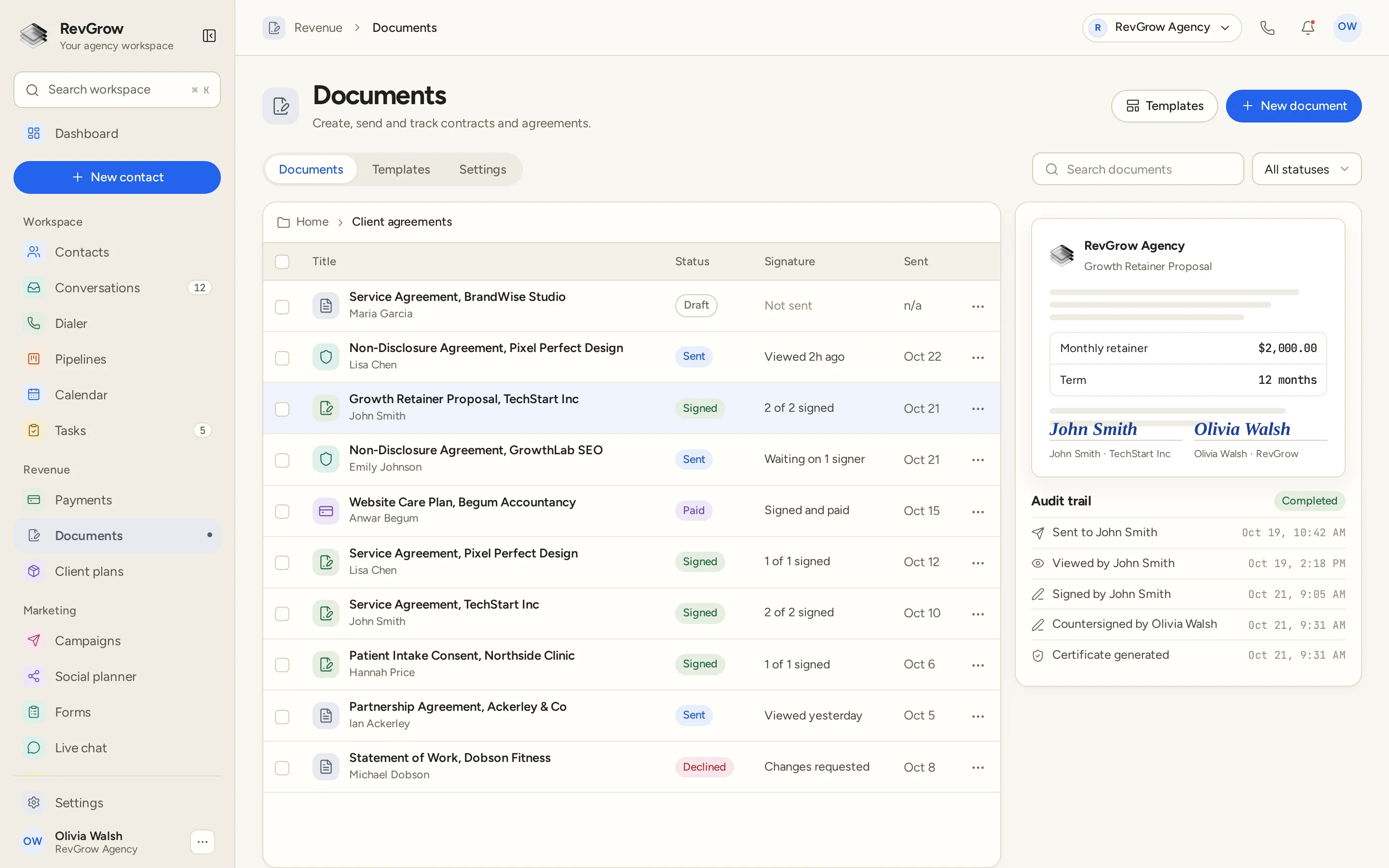
WHAT IT DOES
Put a proposal or contract together from blocks for text, pricing tables and signature fields. Rearrange them until the document reads the way you want.
Add merge fields for names, companies and other contact details. When you create a document for a contact, those fields fill in from the CRM, so nobody retypes them.
Add every person who needs to sign and set the order they sign in. The list shows how many have signed and who the document is still waiting on.
Answers a signer fills in on the document are written back to the CRM. The contact record stays current without copying details out of a signed PDF.
Keep service agreements, NDAs, proposals and consent forms as templates. Start each new document from one you have already approved.
Collect payment as part of signing, so a client can agree and pay in one step. Paid documents show as signed and paid in the list.
Every document records when it was sent, viewed, signed and countersigned. When signing is complete, a certificate is generated and kept with the document.
Lay out line items in a pricing table and let calculated fields work out the totals, so the numbers in a proposal add up before it goes out.
Export any document as a PDF. Reminders go out until it is signed, and version history keeps earlier drafts within reach.
A CLOSER LOOK
Documents sit in folders, such as Client agreements, with a search box and a status filter above the list. Templates and settings are one tab away.
Each row shows the title, the contact, the status and the date it was sent. Draft, sent, signed, paid and declined are easy to tell apart.
The signature column says what happened last: not sent, viewed, waiting on a signer, how many of the signers have signed, signed and paid, or changes requested.
The preview shows the proposal with its merged details and both signatures. Below it, the audit trail lists each step from sent to certificate generated, with the time of each.
HOW IT WORKS
Lay out the document with blocks, add merge fields, pricing tables and signature fields, and save it to the template library.
Pick the template and the contact. Merge fields fill in from the CRM, and you can adjust anything specific to this client.
Add each signer, set the signing order and send. Add payment on signature if the client should pay as they sign. Reminders go out until it is signed.
Watch views and signatures in the list. When everyone has signed, the certificate is generated, answers write back to the CRM and the PDF is ready to export.
FOR AGENCIES
Documents and e-sign is one module in the CRM you white-label. Each client account has its own documents, templates and contacts. You set the templates, the team and the brand.
Documents, templates and signing history stay inside that client's account. One client's agreements never appear in another client's workspace.
Build the agreements your clients need once, then start each new document from the template library inside their account.
Logo, colors, fonts and domains are yours, in the workspace and in the documents clients send for signature.
Documents and e-sign ships with the other modules. It is not a paid add-on, and there is no per-document or per-seat fee from RevGrow.
Already sending documents from another CRM? Free migration covers contacts, conversations, pipelines and the rest. Email hamid@revgrow.app with the tool you use today. Keep the old tool running until you are ready.
The agreement stays with the client. The brand stays yours.
THE REST OF THE PLATFORM
Estimates, invoices, subscriptions and client wallets on your own Stripe.
Explore ↗One database for every client, with custom fields, tags, smart lists and clean CSV import and export.
Explore ↗Kanban boards with weighted values, stage rules and stale-deal alerts.
Explore ↗FAQ
Proposals, service agreements, NDAs, statements of work, consent forms and other documents your team sends. Build them with the block editor, or start from a template in the library.
Add merge fields to a template for details such as the contact's name and company. When you create a document for a contact, those fields fill in from the CRM, so each document is ready without retyping.
Yes. Add every signer and set the signing order. The list shows how many have signed, such as 1 of 2, and who the document is still waiting on. Reminders go out until it is signed.
Yes. Turn on payment on signature and the client can agree and pay in one step. Pricing tables and calculated fields keep the totals correct, and paid documents show as signed and paid.
Yes. Each document records when it was sent, viewed, signed and countersigned, with a timestamp for each step. When signing is complete, a certificate is generated and kept with the document.
Signed answers write back to the CRM, so the contact record is updated with what the signer entered. You can also export the finished document as a PDF.
Yes. Documents and e-sign is included with the other modules in the one-time licence, with no extra fee to turn it on and no per-document or per-seat charge from RevGrow. Your name, logo, colors, fonts and domains are what clients see.
Yes. Free migration covers contacts, conversations, pipelines, workflows, calendars and the rest. Email hamid@revgrow.app with the tool you use today. Keep your current CRM running until you are ready to switch.
YOUR NEXT CHAPTER STARTS HERE
Join the waitlist and lock in the $799 one-time founding price. Pay once, own the code, run every client under your brand.
Founding price for the first 50 only