Drag-and-drop boards and list view
Work the pipeline as a Kanban board, or switch to the list when you want to sort, search and scan. Same deals, two ways to look at them.
MODULE 04 / SELL
Track opportunities from the first reply to closed won. Name the stages, weigh the forecast, and see the deals that have gone quiet. Pipelines is included in RevGrow, and each client account runs it under your brand.
Join the waitlist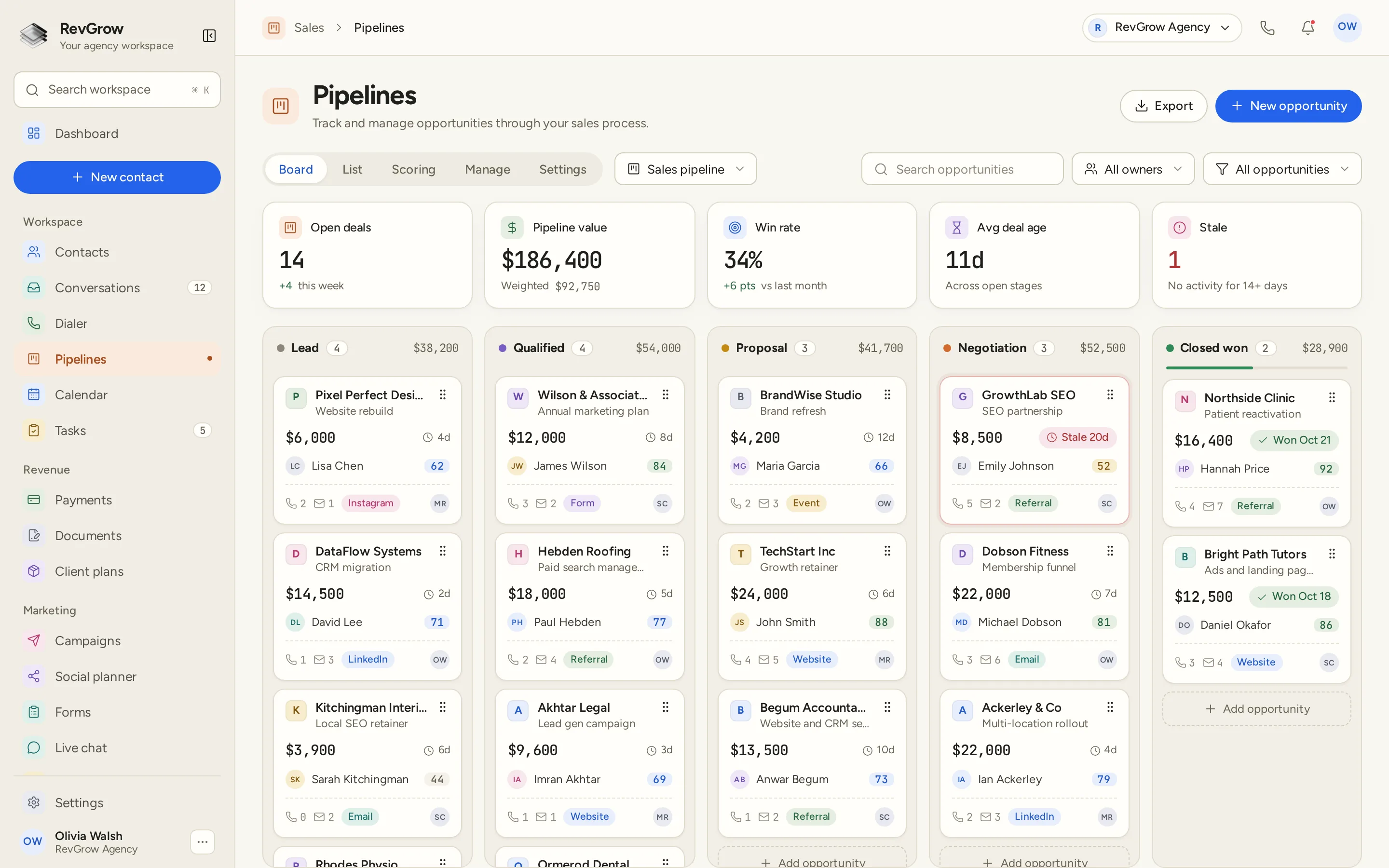
WHAT IT DOES
Work the pipeline as a Kanban board, or switch to the list when you want to sort, search and scan. Same deals, two ways to look at them.
Pipeline value and weighted value sit together, so a full board and a likely-to-close board do not look the same. Win rate and average age are on that same row.
Run a sales pipeline, an onboarding pipeline and a renewal pipeline side by side. Each one has its own stages, and each client account can have its own set.
Score deals from the signals you care about. The score sits on the card, so the team can sort effort toward the opportunities most likely to close.
Deals with no activity for 14 or more days are counted above the board, and a quiet card is marked in its column. Follow-up does not depend on memory.
Ask for the details that matter before a deal can move, and keep a history of where it has been. The next person on the account can see the path, not just the current stage.
Calls, messages and notes stay with the deal. The card shows the activity already logged, and the source it came from, so context is there before anyone opens it.
Add what you are selling, and keep the proposal or agreement on the same opportunity. The deal, the price and the paperwork stay together.
A stage change can start a workflow: assign an owner, send the next message, or create a task. Round-robin shares new opportunities across the team.
Build a pipeline once and reuse it when you open the next client account. New work starts from a setup you already trust, not a blank board.
A CLOSER LOOK
Each column is a stage, with a count and a total. Drag a card when the deal moves. The sample board runs from lead to closed won. Yours uses the names your process actually uses.
Open deals, pipeline value, weighted value, win rate, average age and a stale count. You can read the health of the pipeline before you open a single opportunity.
Stale means no activity for 14 or more days. The count sits in the top row, and the card itself is marked, so a long silence does not hide in the middle of a column.
Every card shows the value, who owns it, where it came from and how it scores, plus the calls and messages already on it. Filter by owner when one pipeline is shared.
HOW IT WORKS
Create a pipeline and name the stages to match how you sell. Use one board for new business, and another when onboarding or renewals need a different path.
Attach the deal to a contact, set the value and the owner, and place it on the board. Products, line items and documents can live on that same record.
Drag deals forward as they progress. Stage rules can require the details you need before a move, and the history stays on the deal.
Let a workflow take it from there: assign an owner, send the message, or create the task. Round-robin keeps new deals from piling up on one person.
FOR AGENCIES
Pipelines is one module in the CRM you white-label. Each client gets an account of their own. You set the stages, the templates and the brand.
Deals, contacts and history stay inside that client's account. One board never spills into the next client's work.
Build the pipeline you want new clients to begin with, then reuse the template. The next account opens from a setup you already trust.
Logo, colors, fonts and domains are yours. Clients work in your platform, including the board they check every day.
Pipelines ships with the other modules. It is not a paid add-on, and there is no per-seat fee to put the team on it.
Already running pipelines in another CRM? We move them for you, free, or you import them yourself. Keep the old tool running until you are ready.
The board stays current. The brand stays yours.
THE REST OF THE PLATFORM
One database for every client, with custom fields, tags, smart lists and clean CSV import and export.
Explore ↗Visual builder with triggers, branches, waits, webhooks and AI steps.
Explore ↗Booking pages on your domain, two-way calendar sync, reminders and paid bookings.
Explore ↗FAQ
Yes. You can run more than one pipeline, each with its own stages, and each client account can have its own set. Name the stages to match the way you sell, require the details you need before a deal moves, and keep the history of those moves on the record.
Yes. The board is drag and drop, so a deal moves when you pull the card into the next stage. Switch to the list when you would rather sort, search or scan a long pipeline. Scoring has its own tab on the same screen.
Pipeline value is the total of open deals. Weighted value is the forecast shown beside it, so a busy board and a board that is likely to close do not look the same. Win rate and average deal age sit on that same row.
The board counts opportunities with no activity for 14 or more days, and a quiet card is marked in its column. You can see the stale work without opening every deal.
Yes. A stage change can start a workflow, which can assign an owner, send the next message or create a task. Round-robin assignment can share new deals across the team instead of landing them on one person.
Yes. Pipelines is part of the platform you white-label. Your name, logo, colors, fonts and domains are what clients see, and their deals stay in their own account.
Yes. All 18 modules are included in the one-time licence, Pipelines among them. There is no extra fee to turn this module on, and no per-seat charge.
Yes. We move pipelines and opportunities for you, free, along with contacts, workflows, calendars, conversations and the rest. You can also import them yourself with the built-in tools. Keep your current CRM running until you are ready.
YOUR NEXT CHAPTER STARTS HERE
Join the waitlist and lock in the $799 one-time founding price. Pay once, own the code, run every client under your brand.
Founding price for the first 50 only