Payments on each client's own Stripe
Each client connects a Stripe account of their own. Manage billing in RevGrow while payment processing stays with the Stripe account connected to that client's workspace.
MODULE 09 / GET PAID
Create estimates, send invoices and manage recurring billing from the same workspace. Each client connects their own Stripe account, with transactions and outstanding invoices in view. Invoicing and payments is included in RevGrow, and each client account runs it under your brand.
Join the waitlist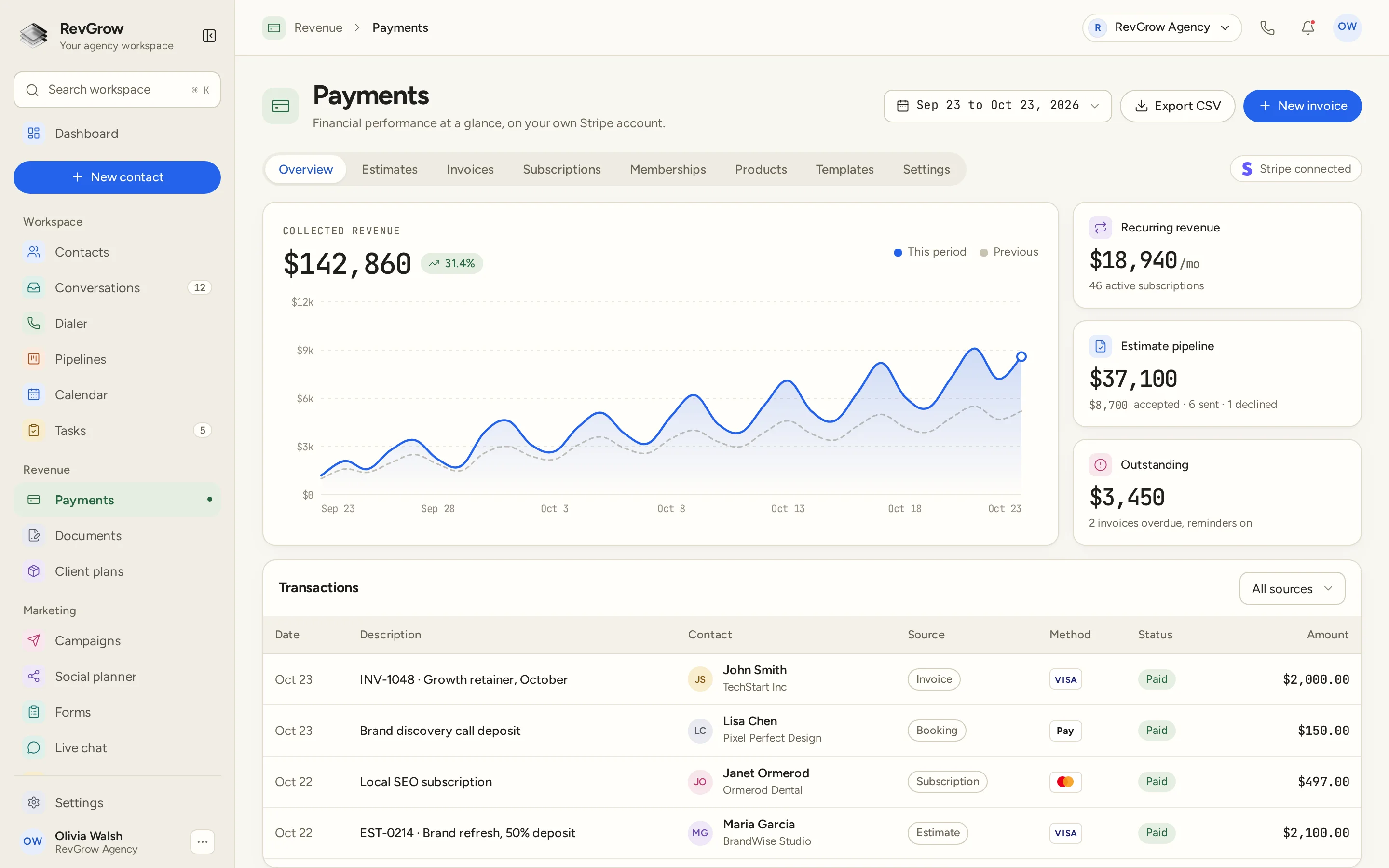
WHAT IT DOES
Each client connects a Stripe account of their own. Manage billing in RevGrow while payment processing stays with the Stripe account connected to that client's workspace.
Build an invoice and check its live preview as you work. Keep the details in view before sending it to the person who needs to pay.
Turn an estimate into an invoice in one click. Carry the work from the estimate into billing without starting a separate invoice from scratch.
Manage recurring billing alongside one-off invoices. The overview keeps recurring revenue and active subscriptions visible beside the rest of the payment activity.
Use client wallets with auto top-up for the accounts that need a balance. Manage that billing setup alongside invoices and subscriptions in the same module.
Bring signing and payment together in one step. Keep the agreement and the payment in the same client flow when both are needed to move the work forward.
Keep the products you bill for in a catalog, and group them into bundles. Use that catalog as the starting point for the services or products on an estimate or invoice.
Set up templates, invoice numbering and payment terms for the way the client bills. Reuse those details as new invoices go out.
Send overdue reminders automatically when an invoice still needs payment. The overview keeps outstanding invoices in view so the team can see the work that needs attention.
A CLOSER LOOK
The date selector sets the period above the collected revenue chart. This period and Previous appear together, so the chart shows the comparison in the same view. The amounts and growth shown are sample data.
The side cards separate recurring revenue, the estimate pipeline and outstanding invoices. Subscription counts, estimate activity and overdue invoices sit beside the corresponding totals in this sample.
The table shows date, description, contact, source, method, status and amount. Invoice, Booking, Subscription and Estimate sources appear together, with an All sources filter above the rows.
Estimates, Invoices, Subscriptions, Memberships, Products, Templates and Settings sit in the tab row. Stripe connected, Export CSV and New invoice remain visible above the overview.
HOW IT WORKS
Connect the Stripe account the client owns to their workspace. Keep that client's billing setup inside their own account.
Set up products and bundles, templates, numbering and payment terms. Create an estimate or go straight to an invoice, checking the live preview as you work.
Convert an estimate to an invoice when it is time to bill. Use recurring billing for ongoing work, or sign and pay together when the client flow needs both.
Return to the overview to review transactions, subscriptions and outstanding invoices. Use automatic overdue reminders for invoices that still need payment, and export the activity to CSV when needed.
FOR AGENCIES
Invoicing and payments is one module in the CRM you white-label. Each client account keeps its own billing setup and connected Stripe account. You set the templates, the process and the brand.
Invoices, products and billing records stay inside that client account. One client's billing work stays separate from the next client's workspace.
Each client connects their own Stripe. The agency can provide the billing workspace under its brand while the client keeps control of the connected payment account.
Logo, colors, fonts and domains are yours. Clients manage estimates, invoices and payment activity inside your platform.
Invoicing and payments ships with the other modules. Billing records and contacts stay together in the same platform, with Stripe handling payment processing.
Already billing from another CRM? Free migration covers your product catalog and billing records, along with contacts and the rest. Email hamid@revgrow.app with the tool you use today. Keep the old tool running until you are ready.
The billing stays connected. The brand stays yours.
THE REST OF THE PLATFORM
One database for every client, with custom fields, tags, smart lists and clean CSV import and export.
Explore ↗Templates with merge fields, signing order, audit trail and payment on signature.
Explore ↗Booking pages on your domain, two-way calendar sync, reminders and paid bookings.
Explore ↗FAQ
Yes. Each client connects their own Stripe account to their workspace. RevGrow provides the estimates, invoices and billing workspace under your brand, while processing uses that client's connected Stripe account.
Yes. Invoices have a live preview as you build them, and an estimate can become an invoice in one click. Set templates, numbering and payment terms for the billing process you use.
Yes. Recurring billing sits alongside one-off invoices. The Payments overview shows recurring revenue and active subscriptions, with a Subscriptions tab for that part of the billing work.
Yes. Client wallets support auto top-up. Use them for clients that need a balance, alongside the invoice and recurring billing tools in the same module.
Yes. Sign and pay brings signing and payment into one step when both are part of the client flow. Documents and e-sign is a related module for the agreement side of that work.
Yes. Keep products in a catalog, group them into bundles and reuse templates for new billing work. Invoice numbering and payment terms can also be set for the way you bill.
The overview brings collected revenue, recurring revenue, the estimate pipeline and outstanding invoices together. The transaction table shows the contact, source, method and status, with a source filter and CSV export. Automatic overdue reminders handle invoices that still need payment.
Yes. Invoicing and payments is included with the other modules under your name, logo, colors, fonts and domains. Free migration covers your product catalog and billing records, along with contacts and the rest. Email hamid@revgrow.app with the tool you use today, and keep your current CRM running until you are ready to switch.
YOUR NEXT CHAPTER STARTS HERE
Join the waitlist and lock in the $799 one-time founding price. Pay once, own the code, run every client under your brand.
Founding price for the first 50 only