Embed on any website
Copy one script tag onto the client's site and the chat bubble appears. It works on any website that lets you add a snippet, whatever it was built with.
MODULE 16 / COMMUNICATE
Put a chat bubble on any client website in the client's colors, with their greeting. An AI first reply can answer straight away and hand off to a person, and every chat lands in the unified inbox. Live chat is included in RevGrow, and each client account runs it under your brand.
Join the waitlist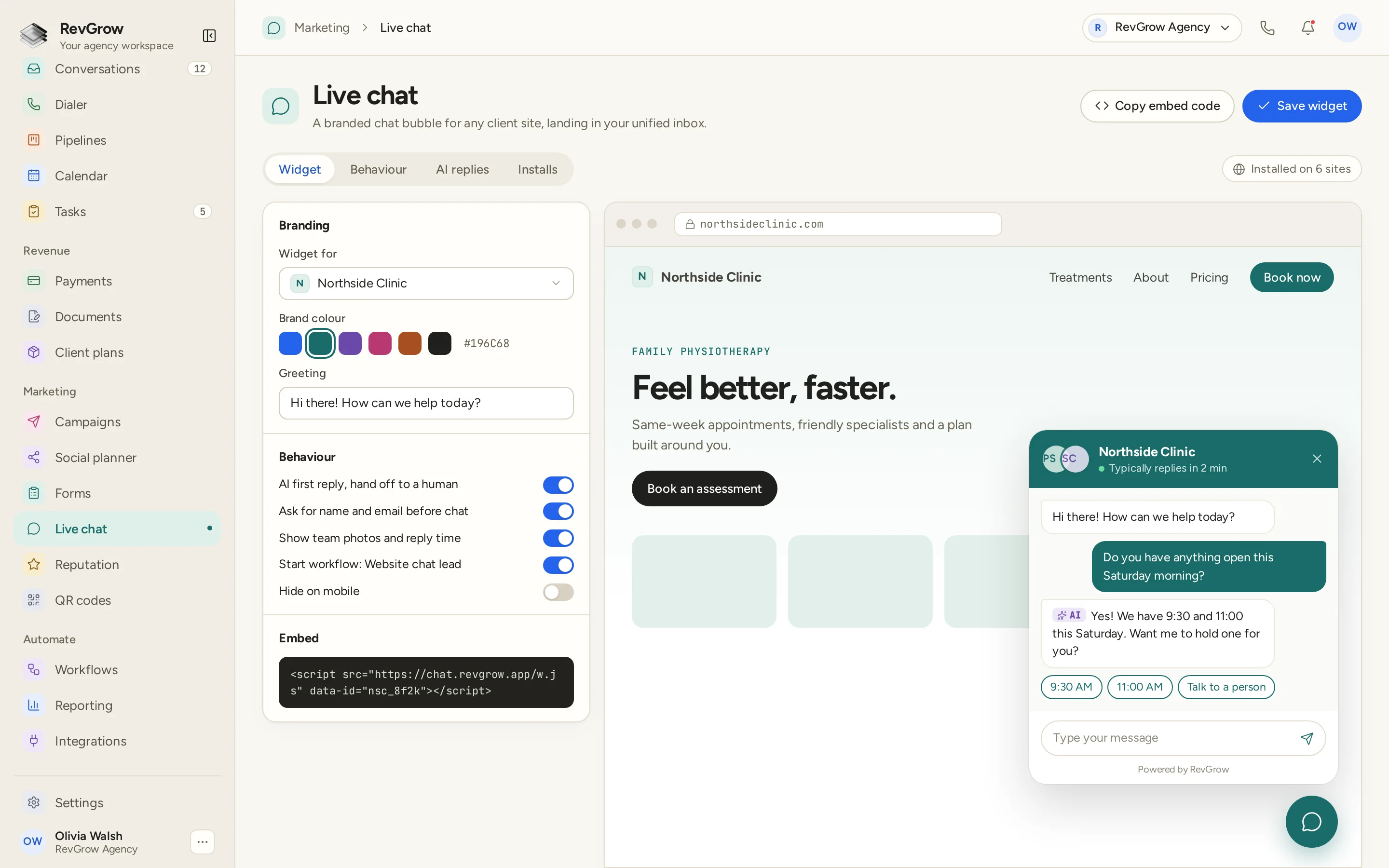
WHAT IT DOES
Copy one script tag onto the client's site and the chat bubble appears. It works on any website that lets you add a snippet, whatever it was built with.
Each widget has its own brand colour and greeting, set for the client it belongs to. Visitors see the client's look, not a generic chat tool.
Visitors get the chat bubble they already know how to use, with the team's photos and typical reply time shown when you turn them on.
Chats arrive in Conversations alongside email, texts and calls. The team answers from the same inbox it already works in.
Ask for a name and email before the chat starts, and the visitor is saved as a contact. The conversation stays on their record for whoever follows up.
Let AI answer first so visitors are not left waiting, then hand off to a person. Visitors can ask for a person at any point in the chat.
Start a workflow from a new chat, such as a website chat lead workflow that tags the contact, notifies the team or sends a follow-up.
RevGrow does not charge for each chat. Put the widget on as many client sites as you need and answer every conversation.
A CLOSER LOOK
Choose which client the widget is for, pick a brand colour from the swatches or enter a hex code, and write the greeting visitors see first.
Toggles cover the AI first reply with hand-off, asking for name and email, showing team photos and reply time, starting a workflow and hiding the bubble on mobile.
The embed code sits under the settings, ready to copy. The installs count at the top shows how many sites the widget is running on.
The preview shows the bubble on the client's website as visitors will see it, with the greeting, an AI reply offering times and a button to talk to a person.
HOW IT WORKS
Create a chat widget for the client, set its brand colour and greeting, and choose how it behaves.
Copy the embed code onto the client's website. The bubble appears on the site as soon as the snippet is in place.
Chats land in the unified inbox. Let the AI first reply handle the opening and step in when the visitor needs a person.
Start workflows from new chats, so every website lead is tagged, assigned and followed up without anyone copying details across.
FOR AGENCIES
Live chat is one module in the CRM you white-label. Each client account has its own widgets, chats and contacts. You set the widgets, the team and the brand.
Widgets, chats and the contacts they create stay inside that client's account. One client's visitors never appear in another client's inbox.
Create a widget for each client website with its own colour and greeting, and see where each one is installed.
Logo, colors, fonts and domains are yours. Clients set up and answer their chats in your platform.
Live chat ships with the other modules. It is not a paid add-on, and there is no per-seat or per-conversation fee from RevGrow.
Already running chat from another CRM? Free migration covers contacts, conversations, pipelines and the rest. Email hamid@revgrow.app with the tool you use today. Keep the old tool running until you are ready.
The conversation stays in the inbox. The brand stays yours.
THE REST OF THE PLATFORM
Six channels, one thread per contact, live updates and team assignment.
Explore ↗Visual builder with triggers, branches, waits, webhooks and AI steps.
Explore ↗One database for every client, with custom fields, tags, smart lists and clean CSV import and export.
Explore ↗FAQ
Create a widget, then copy its embed code onto the site. It is a single script tag, so it works on any website that lets you add a snippet.
Yes. Each widget is set up for one client, with its own brand colour and greeting. You can also show the team's photos and typical reply time in the chat.
Chats land in the unified inbox, next to email, texts and calls. The team answers them from Conversations, and the chat stays with the contact's history.
Turn on the AI first reply and it answers visitors straight away, then hands off to a person. Visitors can also choose to talk to a person during the chat.
Yes. Turn on asking for name and email before the chat, and visitors become contacts in the CRM with the conversation on their record.
Yes. A new chat can start a workflow, for example to tag the lead, assign it to someone or send a follow-up. You can also hide the bubble on mobile if a site needs it.
Yes. Live chat is included with the other modules in the one-time licence, with no extra fee to turn it on and no per-seat or per-conversation charge from RevGrow. Your name, logo, colors, fonts and domains are what clients see.
Yes. Free migration covers contacts, conversations, pipelines, workflows, calendars and the rest. Email hamid@revgrow.app with the tool you use today. Keep your current CRM running until you are ready to switch.
YOUR NEXT CHAPTER STARTS HERE
Join the waitlist and lock in the $799 one-time founding price. Pay once, own the code, run every client under your brand.
Founding price for the first 50 only