Your tiers and margin
Define the tiers you want to sell and set the billing terms and margin for your offer. Keep the package tied to the features and services the client will use.
MODULE 17 / GET PAID
Package the CRM into your own tiers and sell them through a checkout link. Each plan unlocks the features you choose, with payment on your Stripe and onboarding started by the purchase. Client plans and billing is included in RevGrow, under your brand.
Join the waitlist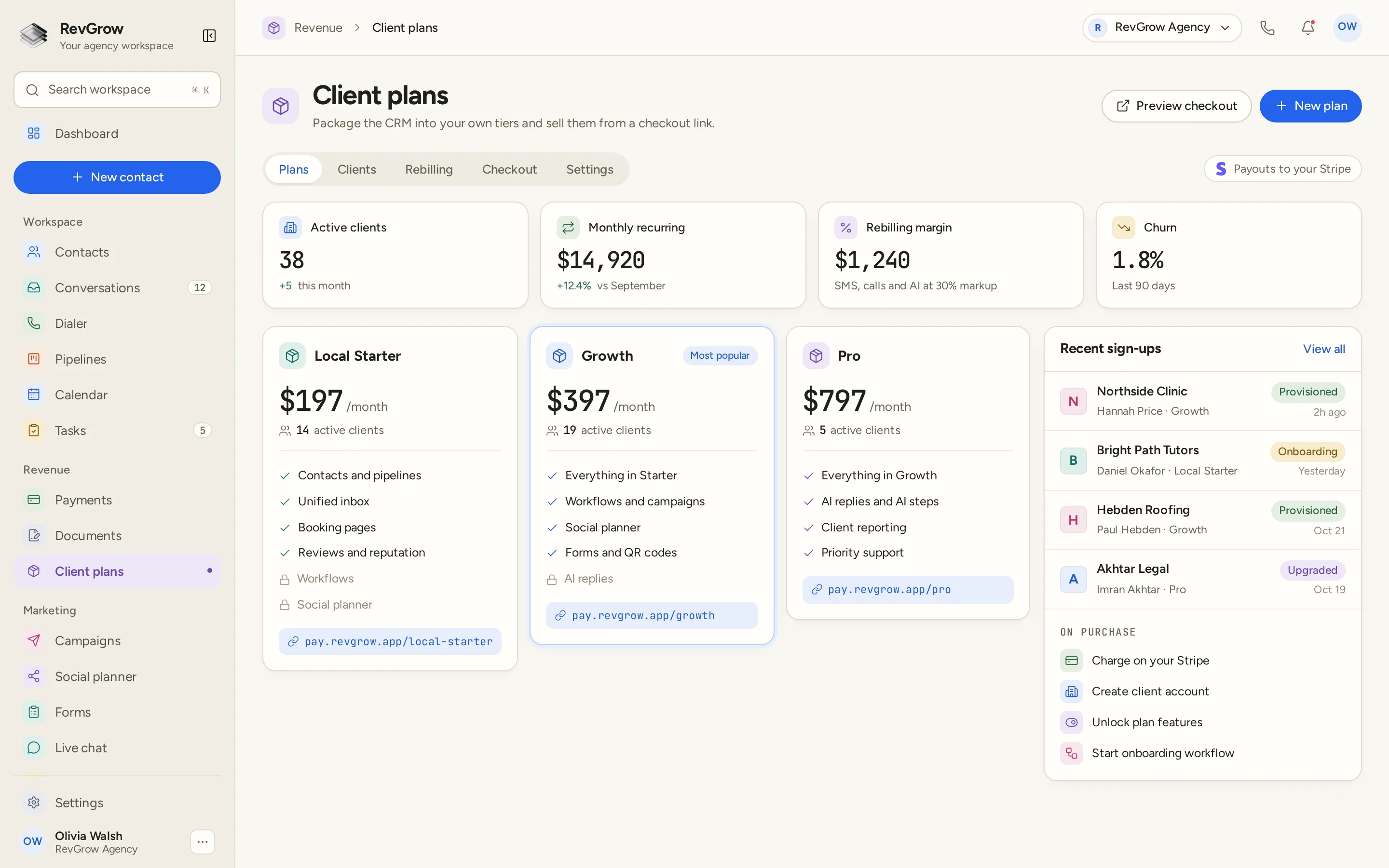
WHAT IT DOES
Define the tiers you want to sell and set the billing terms and margin for your offer. Keep the package tied to the features and services the client will use.
Give each plan a public checkout link. Share the plan with a prospect, and preview the checkout from the same workspace where you manage the offer.
Choose which features each tier unlocks. The sample plan cards show included features alongside locked ones, so the package has a clear relationship to the access a client receives.
Move clients between plans as their needs change. Manage upgrades and downgrades within the plan system, keeping the client account connected to the package they use.
Rebill usage with the markup you set. The sample shows messaging, calls and AI usage as part of rebilling, with a margin summary beside the other agency metrics.
Let the purchase begin the setup. The sample purchase sequence charges through Stripe, creates the client account, unlocks plan features and starts the onboarding workflow.
Connect the Stripe account you own for plan payments. The agency keeps its plan checkout and payment setup together, with payouts directed to its Stripe account.
Retire a tier while keeping active clients supported. Change the plans you offer without leaving the clients already on a retired tier stranded.
A CLOSER LOOK
The sample has three agency tiers with feature lists and checkout links. A highlighted plan carries a Most popular label. Preview checkout and New plan sit above the cards. These are sample packages, not RevGrow licence tiers.
Active clients, monthly recurring revenue, rebilling margin and churn sit across the top. Supporting details show recent client growth and the period being compared. The figures belong to this sample account.
The On purchase panel lists the sequence: charge on your Stripe, create the client account, unlock plan features and start the onboarding workflow. The checkout is connected to the account setup it starts.
Recent sign-ups shows the client, contact, plan and status. Provisioned, Onboarding and Upgraded appear in the sample. Plans, Clients, Rebilling, Checkout and Settings organize the wider workspace.
HOW IT WORKS
Connect the agency Stripe account that will receive payments for the plans. Keep that payment setup with the plans you sell under your brand.
Define each package and choose the features it unlocks. Set the billing terms and any usage rebilling markup for the offer you want to sell.
Check the checkout, then share the public link for the plan. A purchase starts the payment and account setup sequence.
Follow onboarding and plan changes in the client workspace. Handle upgrades and downgrades, review rebilling, and retire tiers while keeping active clients supported.
FOR AGENCIES
Client plans and billing is the part of the CRM you use to package and sell your own client offers. You choose the tiers, feature access and rebilling markup, with checkout running on your Stripe.
Build the offer around the clients you serve. Each plan can unlock a different set of features, and the client can move between plans as the work changes.
A sale starts the account setup and onboarding workflow. Keep the plan a client bought connected to the features they receive and the process that welcomes them.
Logo, colors, fonts and domains are yours. Clients join the platform you brand, through the plans and checkout links you manage.
Client plans and billing ships with the other modules. Your agency packages are the offers you create for clients inside that platform.
Already working from another CRM? Free migration covers contacts, pipelines, workflows, calendars, conversations and the rest. Email hamid@revgrow.app with the tool you use today so we can review the setup with you. Keep the old tool running until you are ready.
The plan connects to the setup. The brand stays yours.
THE REST OF THE PLATFORM
Estimates, invoices, subscriptions and client wallets on your own Stripe.
Explore ↗Visual builder with triggers, branches, waits, webhooks and AI steps.
Explore ↗One database for every client, with custom fields, tags, smart lists and clean CSV import and export.
Explore ↗FAQ
Yes. Create the tiers for your offer, set their billing terms and choose which features each one unlocks. The sample cards show included and locked features for different packages. Those packages are examples of an agency offer.
Yes. Each plan has a public checkout link you can share. Preview checkout from the plans screen before sharing the link for the package you want the client to buy.
A purchase starts onboarding automatically. The sample shows payment through your Stripe, client account creation, plan feature access and an onboarding workflow as the steps that follow checkout.
Yes. Client plans runs on your Stripe account, with payouts directed there. Connect the agency account you own for the plans you sell to clients.
Yes. Usage rebilling supports the markup you set. The sample includes messaging, calls and AI usage in rebilling and shows the resulting margin in the agency summary.
Yes. Upgrades and downgrades are part of client plan management. Move a client between the packages you offer as their needs change, keeping their account connected to the plan they use.
Retiring a tier does not strand the clients already using it. You can change the plans you offer while keeping active clients on the retired tier supported.
Yes. Client plans and billing is included with the other RevGrow modules. Your name, logo, colors, fonts and domains are what clients see. The agency tiers in the screenshot are sample offers you could create for clients, separate from the RevGrow licence.
YOUR NEXT CHAPTER STARTS HERE
Join the waitlist and lock in the $799 one-time founding price. Pay once, own the code, run every client under your brand.
Founding price for the first 50 only