MODULE 01 / OPERATE

Every contact,
in one database.

People and companies live in one place, with the fields, tags and lists your team uses every day. Import and export by CSV, and let smart lists stay current on their own. Contacts is included in RevGrow, and each client account runs it under your brand.

Join the waitlist
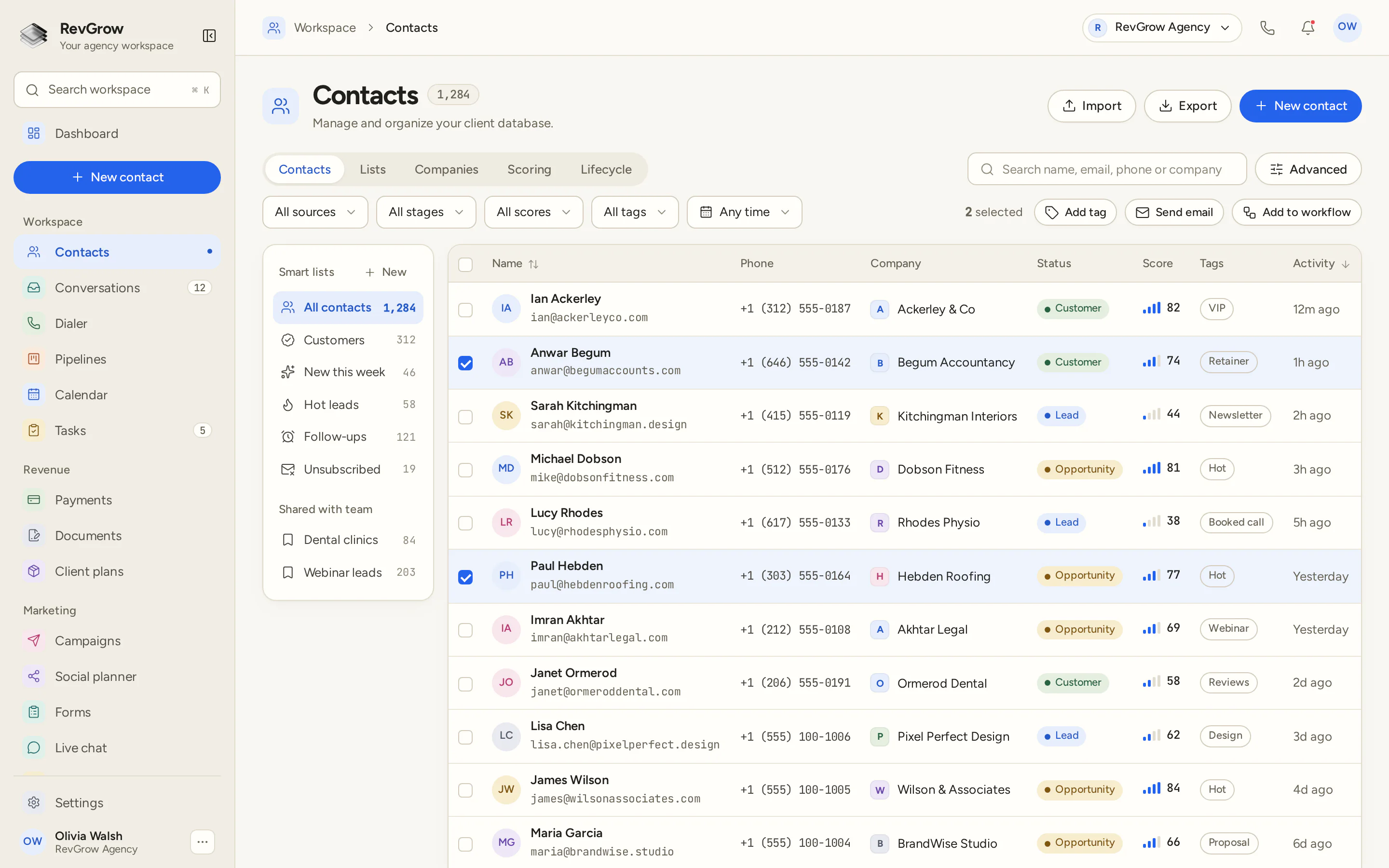
RevGrow Contacts list with smart lists for all contacts, customers, new this week, hot leads and follow-ups, and a table of names, phones, companies, status, scores and tags.
The Contacts list in RevGrow. On your installation, this screen wears your name, logo and colors.

WHAT IT DOES

Everything you keep
on a contact.

01

Smart lists that update themselves

Save a list from the filters you already use: stage, score, tag, source or how recently someone was active. The list keeps itself current, so Customers, Hot leads and Follow-ups are ready the next time you open them.

02

Company records for B2B clients

A company sits beside the people who work there. The row shows the company name, and the Companies tab holds the account when more than one person belongs to it.

03

Lifecycle stages and engagement scores

Each contact has a stage, such as Lead, Opportunity or Customer, and an engagement score you can read in the list. Filter by stage or score when you want one slice of the database.

04

Guided CSV import with field mapping

Bring a CSV across from the tool you use today. Map each column to a RevGrow field, choose whether a duplicate is skipped, updated or created, and check the preview before anything is written.

05

Custom fields in folders

Add the details your agency tracks, and group those fields into folders. A CSV column can map to a custom field, so the record holds the specifics of how you work.

06

Color-coded tags

Tags mark the extra detail on a person: VIP, a retainer, a newsletter, the campaign they came from. Color keeps them easy to scan, and you can filter the list or tag a whole selection at once.

07

Duplicate detection and merge

When the same person shows up twice, find the pair and merge them into one record. Import can also skip or update a contact that already matches, so a CSV does not double the database.

08

Bulk edit, tag and delete

Select the rows you need. From the bar above the table, add a tag, send an email or add those contacts to a workflow. The same selection can be edited or deleted together.

09

Export any time

Export the contacts you are looking at to CSV whenever you need a file. Take a segment with you, or keep a copy of the list you have filtered on screen.

10

Multiple emails and phones per contact

A person can have more than one email and more than one phone. Search still finds them by name, email, phone or company.

11

Pinned rich-text notes

Pin the note the next person on the account should see first. Messages, calls, deals and the rest of the notes stay on the same record, in one timeline.

A CLOSER LOOK

What the list
is showing you.

01

Smart lists beside the table

All contacts, Customers, New this week, Hot leads, Follow-ups and Unsubscribed sit in the sidebar, each with a count. Shared lists, such as a niche or a campaign, live just below for the whole team.

02

One row, the fields you scan

Name, email, phone, company, status, score, tags and last activity. Search by name, email, phone or company, then narrow by source, stage, score, tag or time.

03

Status, score and tags

Status reads as Lead, Opportunity or Customer. The score sits beside it, and tags such as VIP, Hot or Newsletter stay on the row, so a scan of the list shows who needs attention.

04

Act on a selection

Tick the contacts you want to work. Add a tag, send an email or place them in a workflow from the bar above the table. Import, export and a new contact stay in the header.

HOW IT WORKS

From a spreadsheet
to a live database.

01

Bring the records in

Add people by hand, or import a CSV and map the columns. Choose how duplicates are handled, and tag the batch as it lands.

02

Shape the record

Add custom fields in folders, set the tags you use, and name the lifecycle stages. Company records keep a B2B account together with the people on it.

03

Save the lists you return to

Build smart lists for the segments you open every day: customers, new this week, hot leads, follow-ups. They update themselves as contacts change.

04

Work from the same person

Open a contact and the inbox, calls, deals and notes are already there. A pipeline opportunity and a conversation both point back to this record.

FOR AGENCIES

Their contacts.
Your platform.

Contacts is the database inside the CRM you white-label. Each client sub-account has its own people, companies and lists. You set the fields, the lists and the brand.

01

Separate client accounts

People, companies and history stay inside that client's account. One list never appears in the next client's workspace.

02

Fields and lists you reuse

Set up the custom fields, tags and smart lists you want a new client to start with. The next account opens from a setup you already trust.

03

Your name on the screen

Logo, colors, fonts and domains are yours. Clients work in your platform, including the contact list they open every day.

04

Included with the licence

Contacts ships with the other modules. It is not a paid add-on, and there is no per-seat fee to put the team on it.

Already keeping contacts in another CRM? We move them for you, free, or you import a CSV yourself. Keep the old tool running until you are ready.

See how migration works ↗

The database stays current. The brand stays yours.

FAQ

Questions about
Contacts.

Can each client have their own contact database?+

Yes. Each client sub-account has its own database. People, companies, tags and lists stay in that account, and one client's records stay out of the next client's workspace.

What is a smart list?+

A smart list is a saved segment. You choose the filters, such as stage, score, tag or recent activity, and the list updates itself as contacts change. Customers, hot leads and follow-ups can each be a list you open again tomorrow, and a list can be shared with the team.

Can I add custom fields?+

Yes. Custom fields hold the extra details you track, and you can group them into folders. When you import a CSV, a column can map straight to a custom field.

How do tags work on a contact?+

A tag is a label on the person, such as VIP, a retainer or the campaign they came from. Tags are color-coded in the list. Filter by tag, or select several contacts and tag them together. A CSV can include a column of tag names so people are tagged as they import.

How does CSV import and export work?+

Import maps each column to a field. You choose whether a duplicate is skipped, updated or created, and a preview shows what will be written before you confirm. Duplicates on import are matched by email. Export the contacts you are looking at to CSV whenever you need a file.

How do contacts connect to the inbox and pipelines?+

The contact is the record those modules share. A conversation in the inbox, a call and an opportunity on a pipeline all sit on the same person, and that activity shows on the contact. From the list you can send an email or add the people you selected to a workflow.

Can I white-label Contacts for my clients?+

Yes. Contacts is part of the platform you white-label. Your name, logo, colors, fonts and domains are what clients see, and their people stay in their own account. Contacts is included in the one-time licence, with no extra fee to turn it on and no per-seat charge.

Can you move our existing contacts?+

Yes. We move contacts and companies for you, free, along with tags, pipelines, workflows, calendars and conversations. You can also import a CSV yourself. Email hamid@revgrow.app with the tool you use today and roughly how many contacts you have. Keep your current CRM running until you are ready.

See how free migration works ↗
YOUR NEXT CHAPTER STARTS HERE

Your company.
Your CRM.

Join the waitlist and lock in the $799 one-time founding price. Pay once, own the code, run every client under your brand.

No payment now. We will email you when sales open. Unsubscribe any time.

Founding price for the first 50 only

$799 once, no monthly feesFull source codeUnlimited clients and seats
Prefer us to host it? A hosted plan at $97/month is coming later.