Twilio or Telnyx
Connect your own Twilio or Telnyx account for SMS and voice. Keep the calling and messaging provider setup with the CRM where the team works its contacts and conversations.
MODULE 18 / AUTOMATE
Connect the providers you own for messaging, payments, calendars, AI and reporting. Use scoped REST API keys for custom connections, and webhooks to pass events both ways. Integrations and API is included in RevGrow, and each client account runs it under your brand.
Join the waitlist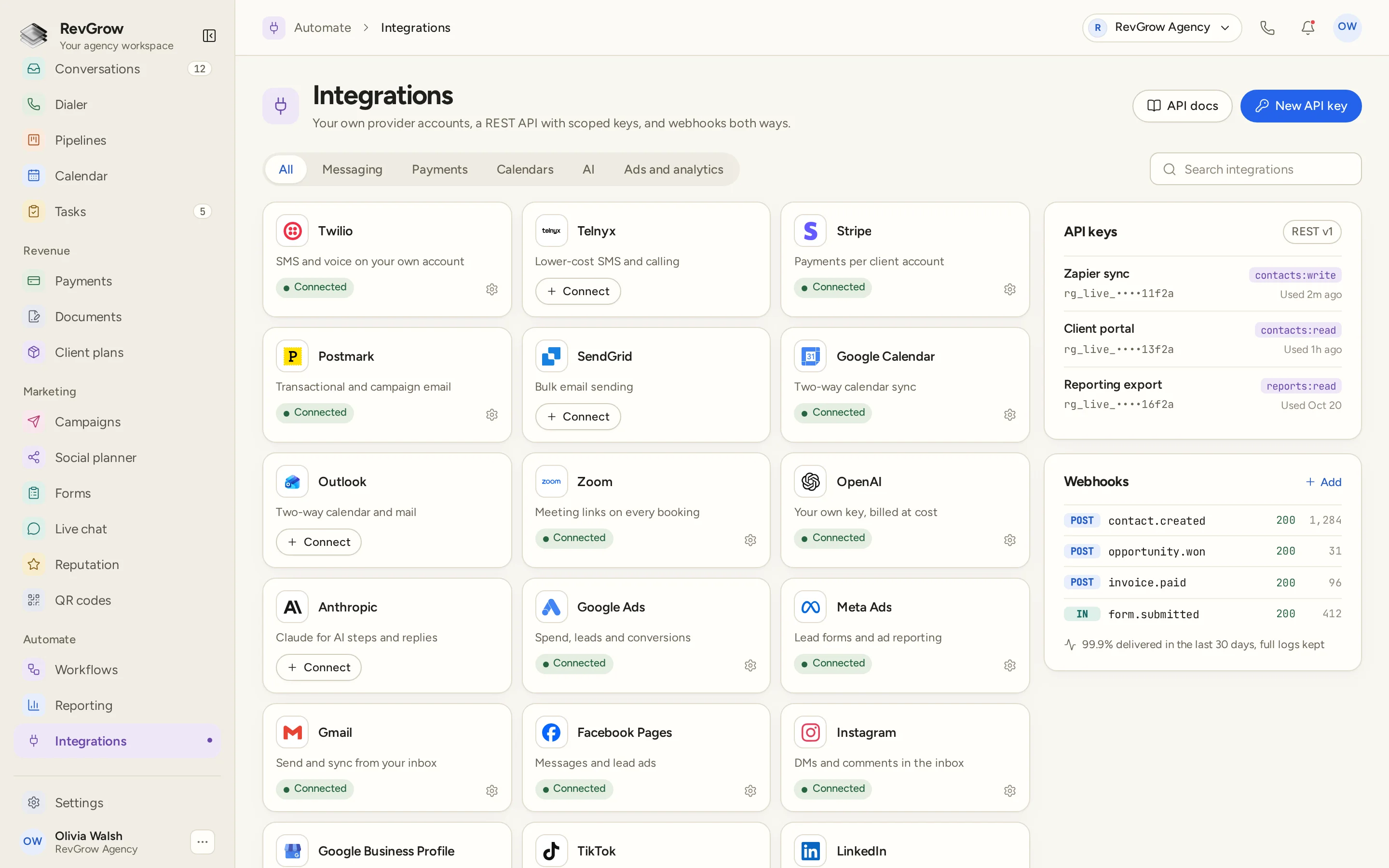
WHAT IT DOES
Connect your own Twilio or Telnyx account for SMS and voice. Keep the calling and messaging provider setup with the CRM where the team works its contacts and conversations.
Use provider accounts you own for email. The sample includes Postmark and SendGrid for sending, plus Gmail and Outlook connections for mailbox work.
Connect Stripe for each client account. Keep the payment provider with the client it belongs to, alongside the other connections used in that workspace.
Turn on the AI reply bot from the connected setup. Keep replies in the same conversation workspace the team uses, with a handoff to a person when the conversation needs one.
Connect your own AI keys for steps and replies. OpenAI and Anthropic appear in the provider list, and usage stays with the provider accounts you connect.
Connect advertising and analytics to bring that activity into the CRM. The sample shows Google Ads for spend, leads and conversions, and Meta Ads for lead forms and reporting.
Keep call tracking connected to your CRM work. Review calling activity alongside the contacts, conversations and reports the team already uses.
Connect Google Calendar or Outlook for two-way calendar sync. Zoom adds meeting links for bookings, keeping the calendar connections beside the rest of the provider setup.
Connect social profiles to the CRM. The sample includes Facebook Pages and Instagram, with messages, lead ads, DMs and comments described on their provider cards.
Use named API keys with scopes for custom connections. The sample separates contact write access, contact read access and reporting read access, with last-used details beside each key.
Send events out to another tool or receive events into the CRM. The webhook panel keeps event names, delivery statuses and activity together, with logs available to review the connection.
A CLOSER LOOK
Provider cards show the service, its purpose and a Connected status or Connect action. Category tabs and search sit above the list so you can find the connection you need.
Messaging, Payments, Calendars, AI and Ads and analytics group the provider list. The sample connects services such as Twilio, Stripe, Postmark, Google Calendar, Zoom and OpenAI in the same workspace.
The API keys panel shows named connections for a sync, a client portal and a reporting export. Each has a masked key, a scope and a last-used detail. API docs and New API key sit in the header.
The webhook panel shows outgoing contact, opportunity and invoice events, plus an incoming form event. Status codes, activity counts and a delivery summary appear together. The figures belong to the sample screen.
HOW IT WORKS
Find the service in the provider list using its category or search. Connect the account you own for the work that client needs.
Connect messaging, email, payments, calendars, AI or advertising as needed. Keep each provider setup with the client account that uses it.
Use a scoped REST API key when another tool needs API access. Use an incoming or outgoing webhook when the process needs to pass events between tools.
Check provider status, key usage details and webhook delivery logs. Return to the connected module to work the messages, bookings, payments or reports those services support.
FOR AGENCIES
Integrations and API is one module in the CRM you white-label. Connect provider accounts you own and use the API or webhooks for the tools your process needs. You set the connections and the brand.
Keep provider connections with the client account that uses them. Stripe connects per client, and messaging, calendars and other services support that client's CRM work.
Bring the provider accounts and AI keys you own. Manage the external services behind your platform while the team works from the CRM.
Logo, colors, fonts and domains are yours. Clients work in your platform, including the screens where they manage their connections.
Integrations and API ships with the other modules. Connected providers bill their own usage, and the API and webhook tools let you connect the rest of your process.
Already working from another CRM? Free migration covers contacts, pipelines, workflows, calendars, conversations and the rest. Email hamid@revgrow.app with the tool you use today so we can review the setup with you. Keep the old tool running until you are ready.
The connections stay yours. The brand stays yours.
THE REST OF THE PLATFORM
FAQ
Yes. Connect Twilio or Telnyx for SMS and voice, and use your own email sending accounts. The provider list includes Postmark and SendGrid, plus Gmail and Outlook mailbox connections. Call tracking is also included.
Yes. Stripe connects per client account. Keep the payment setup with the client it belongs to, alongside the provider connections used for their CRM work.
Yes. Use your own AI keys for AI steps and replies. OpenAI and Anthropic appear in the provider list, and the one-click AI reply bot is included. Provider usage belongs to the accounts you connect.
Google Calendar and Outlook support two-way calendar sync, and Zoom provides meeting links for bookings. Facebook Pages and Instagram appear in the social connections, with messages, lead ads, DMs and comments described in the sample.
Yes. Ads and analytics connections are included. The sample shows Google Ads for spend, leads and conversions, and Meta Ads for lead forms and advertising reports.
Create a named API key and give the connection the scope it needs. The screenshot shows separate contact write, contact read and reporting read scopes, with masked keys and last-used details. Open API docs from the integrations screen for the API reference.
Yes. Webhooks can send events out and receive events in, with delivery activity and logs to review. The sample shows outgoing contact, opportunity and invoice events alongside an incoming form event. Its delivery figures are sample data.
Yes. Integrations and API is included with the other modules under your name, logo, colors, fonts and domains. Bring the provider accounts you own for each client setup. Connected providers bill their own usage.
YOUR NEXT CHAPTER STARTS HERE
Join the waitlist and lock in the $799 one-time founding price. Pay once, own the code, run every client under your brand.
Founding price for the first 50 only