Kanban with time tracking
Move tasks across a board as the work progresses, from to do through in progress and in review to done. Start a timer on a task and the time is logged against it.
MODULE 12 / OPERATE
Plan client work on boards, assign it with a due date and a priority, and track the time it takes. Templates and recurring tasks handle the routine, and workflows create tasks for you. Tasks is included in RevGrow, and each client account runs it under your brand.
Join the waitlist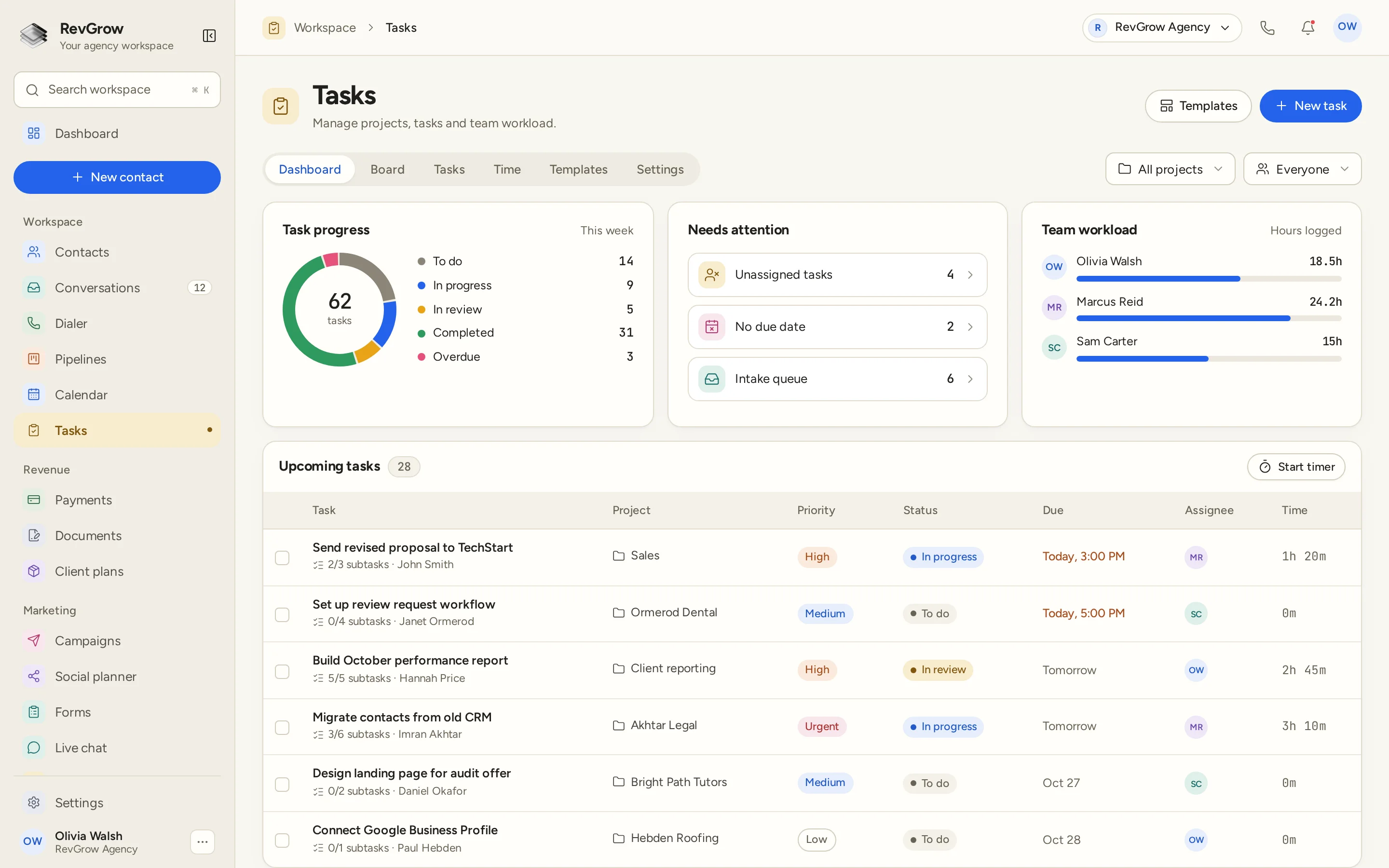
WHAT IT DOES
Move tasks across a board as the work progresses, from to do through in progress and in review to done. Start a timer on a task and the time is logged against it.
Workflows can create tasks for your team automatically, so a new lead, a booking or a form submission turns into work with an owner instead of a note someone has to remember.
Give every task an owner, a due date and a priority of low, medium, high or urgent. The list makes it clear what is due today and what can wait.
Reminders go to the person the task is assigned to, so due dates are not only visible to whoever happens to open the board.
Save repeat work as a template, with its subtasks ready to go. Set routines such as monthly reports as recurring tasks so they come back on schedule.
Break a task into subtasks and see how many are done. Mark tasks that depend on others, and keep the discussion in comments on the task itself.
Incoming submissions land in an intake queue. Review them, then turn each one into a task with an owner and a due date.
A CLOSER LOOK
Task progress counts the week's tasks by status: to do, in progress, in review, completed and overdue, with the total in the middle of the chart.
Unassigned tasks, tasks with no due date and the intake queue each have a count. Open any of them to clear the backlog before it becomes a problem.
Team workload shows the hours each person has logged, so you can see who has room before you assign the next piece of work.
Each upcoming task shows its subtask progress, the contact, the project, the priority, the status, the due date, the assignee and the time logged. Filter by project or by person.
HOW IT WORKS
Create a task against a contact or a project, start from a template, or let a workflow or an intake submission create it for you.
Set the assignee, the due date and the priority. Add subtasks and dependencies when the work has more than one step.
Move the task across the board, track time with the timer and keep the conversation in comments. Reminders keep the due date in front of the assignee.
Check progress, clear what needs attention and compare hours logged across the team on the dashboard. Recurring tasks bring the routine work back.
FOR AGENCIES
Tasks is one module in the CRM you white-label. Each client account has its own projects, tasks and team. You set the templates, the team and the brand.
Projects, tasks and logged time stay inside that client's account. One client's work never appears in another client's workspace.
Build task templates for the services you deliver, such as onboarding or monthly reporting, and reuse them for every client.
Logo, colors, fonts and domains are yours. Clients and their teams plan work in your platform, not someone else's.
Tasks ships with the other modules. It is not a paid add-on, and there is no per-seat fee to put the whole team on it.
Already managing tasks in another CRM? Free migration covers contacts, conversations, pipelines and the rest. Email hamid@revgrow.app with the tool you use today. Keep the old tool running until you are ready.
The work stays organized. The brand stays yours.
THE REST OF THE PLATFORM
Visual builder with triggers, branches, waits, webhooks and AI steps.
Explore ↗One database for every client, with custom fields, tags, smart lists and clean CSV import and export.
Explore ↗Multi-step forms with conditional logic that turn every submission into a contact.
Explore ↗FAQ
Yes. Tasks move across a board by status, such as to do, in progress, in review and done. The same tasks also appear in a list with their project, priority, due date and assignee.
Start a timer on a task and the time is logged against it. Each task shows its logged time, and the dashboard shows hours logged per person so you can see team workload.
Each task can have an assignee, a due date and one of four priorities: low, medium, high or urgent. Add subtasks, dependencies and comments, and link the task to a contact or a project.
Yes. Workflows can create tasks for your team, for example when a lead comes in or a form is submitted. The task arrives with an owner and a due date, ready to work.
Yes. Save repeat work as a template with its subtasks, and set routines as recurring tasks so they come back on schedule without anyone recreating them.
The intake queue collects incoming submissions in one place. The dashboard shows how many are waiting, and each one can be turned into a task with an assignee and a due date.
Yes. Tasks is included with the other modules in the one-time licence, with no extra fee to turn it on and no per-seat charge. Your name, logo, colors, fonts and domains are what clients see.
Yes. Free migration covers contacts, conversations, pipelines, workflows, calendars and the rest. Email hamid@revgrow.app with the tool you use today. Keep your current CRM running until you are ready to switch.
YOUR NEXT CHAPTER STARTS HERE
Join the waitlist and lock in the $799 one-time founding price. Pay once, own the code, run every client under your brand.
Founding price for the first 50 only