Dynamic codes you can re-point
Change where a dynamic QR code sends someone after it has been printed. The poster or card can keep the same code while you update the destination for the next page, offer or booking link.
MODULE 15 / GROW
Create a dynamic QR code for a poster, business card or campaign, then change its destination after printing. Add your colors and logo, download the PNG and track scans in the same workspace. QR codes is included in RevGrow, and each client account runs it under your brand.
Join the waitlist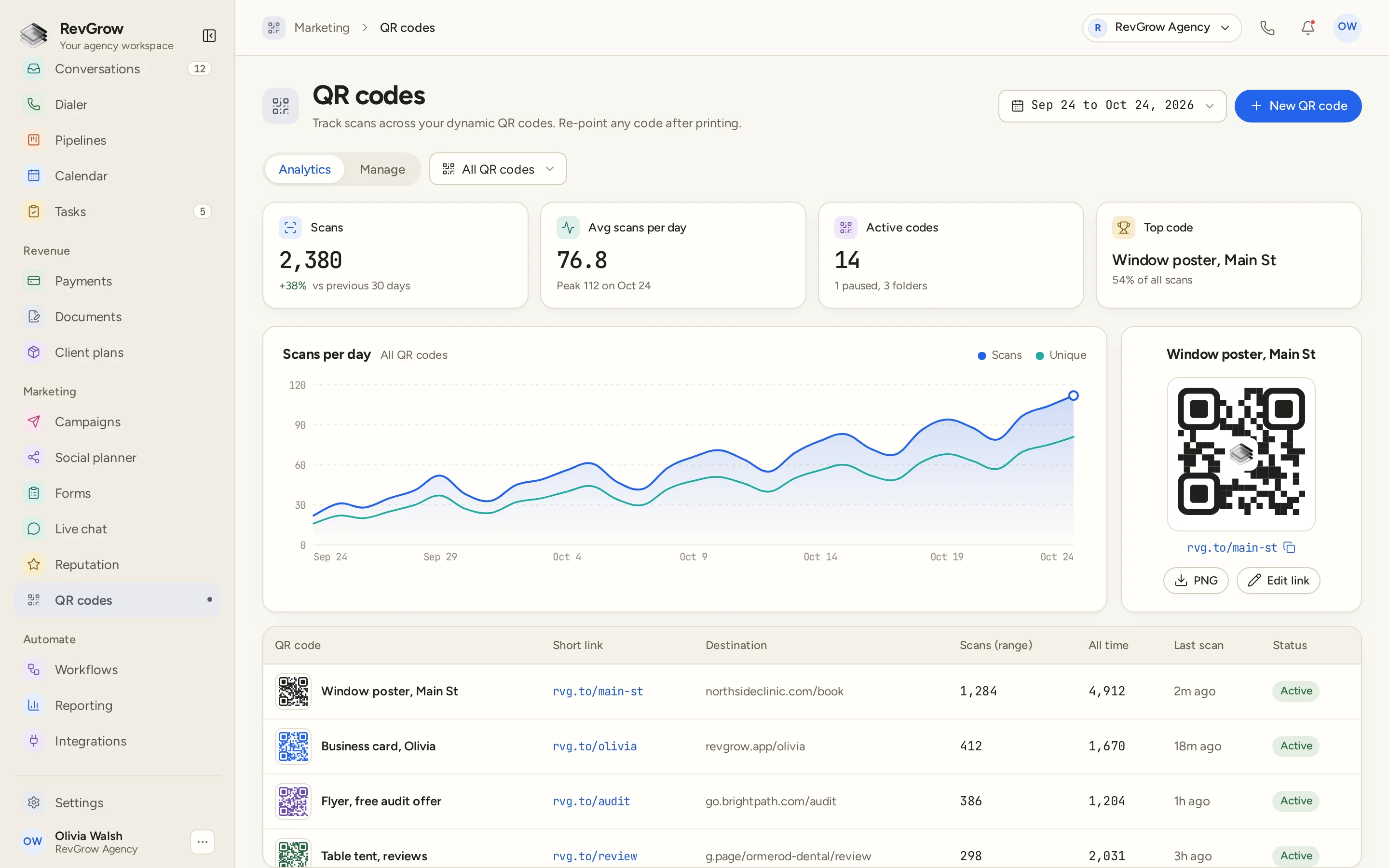
WHAT IT DOES
Change where a dynamic QR code sends someone after it has been printed. The poster or card can keep the same code while you update the destination for the next page, offer or booking link.
Track scans over time and review the codes people use. The dashboard shows scans, average scans per day and the top code, with a daily chart that separates scans and unique scans.
Give the QR code your colors and logo. The preview keeps the design in view, so the code can sit with the rest of the branding on the printed material.
Download a PNG for the material you are preparing, or copy the short link. Keep the QR image, short link and destination together when you return to edit the code.
Organize codes into folders so the collection stays manageable as you add campaigns and placements. Keep a window poster, a business card and a flyer easy to find again.
Pause a code when you need to stop using it without deleting the record. Keep the code in the workspace and use its status to see which ones are active or paused.
QR codes is included with the other modules, with no per-scan fees. Track activity across the codes you use without adding a charge for each scan.
A CLOSER LOOK
The date range sits above the Analytics and Manage tabs. An All QR codes selector sets the scope of the view, and New QR code stays in the header.
Scans, average scans per day, active codes and the top code sit across the top. The chart below plots scans and unique scans through the selected period. These figures belong to the sample dashboard.
The selected window poster has a branded QR preview, a short link with a copy control, and PNG and Edit link actions. The code image and its destination controls stay together.
The table keeps the code name, short link, destination, scans in range, all-time scans, last scan and status on one row. The sample includes a window poster, business card, flyer and review table tent.
HOW IT WORKS
Add a dynamic QR code and set its destination. Give it a name that identifies the placement or campaign, such as the window poster or business card in the sample.
Choose the colors and logo for the code, check its preview and organize the collection into folders so you can find it again.
Download the PNG for the printed material, and copy the short link when you need it. Keep the same printed code when the destination needs to change.
Choose a period and review scan activity. Re-point the code to a new destination when needed, or pause it without deleting the record.
FOR AGENCIES
QR codes is one module in the CRM you white-label. Each client account keeps its own codes and scan activity. You set the destinations, the code design and the brand.
Codes, destinations and scan activity stay inside that client account. One client's printed campaigns stay separate from the next client's workspace.
Use the same printed code as the page behind it changes. A booking page, a form or a review destination can be managed from the code's link settings.
Logo, colors, fonts and domains are yours. Clients manage codes inside your platform, and the QR designs can use their own colors and logo.
QR codes ships with the other modules, with no per-scan fees. Code management and scan analytics sit in the same platform as the rest of the client work.
Already working from another CRM? Free migration covers contacts, pipelines, workflows, calendars, conversations and the rest. Email hamid@revgrow.app with the tool you use today. Keep the old tool running until you are ready.
The printed code stays useful. The brand stays yours.
THE REST OF THE PLATFORM
Multi-step forms with conditional logic that turn every submission into a contact.
Explore ↗Booking pages on your domain, two-way calendar sync, reminders and paid bookings.
Explore ↗Review requests, Google review sync, smart routing and replies from one screen.
Explore ↗FAQ
Yes. The codes are dynamic, so you can re-point a code after printing. Update its destination while the same QR code remains on the poster, card or other material.
The dashboard shows scans, average scans per day, active codes and the top code. A daily chart separates scans and unique scans. The code table also shows scans for the selected range, all-time scans and the last scan. The screenshot figures are sample data.
Yes. Add brand colors and a logo to the QR design. The selected code has a preview beside its short link, so you can review the design before downloading it.
Yes. Download the QR image as a PNG for your material, or copy its short link. The preview panel keeps PNG download and link editing beside the selected code.
Yes. Folders help organize the codes as you add placements and campaigns. Name each code for its use so a poster, flyer or business card is easy to find again.
Yes. Pause a code while keeping its record in the workspace. Status lets you see which codes are active or paused, and you can manage the code without deleting it.
Yes. Set the destination to the link you want someone to open, such as a form, a booking page or a review destination. The sample shows codes for a poster, business card, offer flyer and review table tent.
Yes. QR codes is included with the other modules under your name, logo, colors, fonts and domains, with no per-scan fees. Each client account keeps its own codes and scan activity, and QR designs support brand colors and a logo.
YOUR NEXT CHAPTER STARTS HERE
Join the waitlist and lock in the $799 one-time founding price. Pay once, own the code, run every client under your brand.
Founding price for the first 50 only