Calendar with drag to reschedule
See the week or the month at a glance, or switch to a list. Drag a post to another day or time and it is rescheduled, with no need to open and edit it.
MODULE 14 / GROW
Write once and publish to Facebook, Instagram, X, LinkedIn, TikTok, YouTube, Pinterest and Google Business. Plan the week on a calendar, send posts for client approval, and see what performs. Social planner is included in RevGrow, and each client account runs it under your brand.
Join the waitlist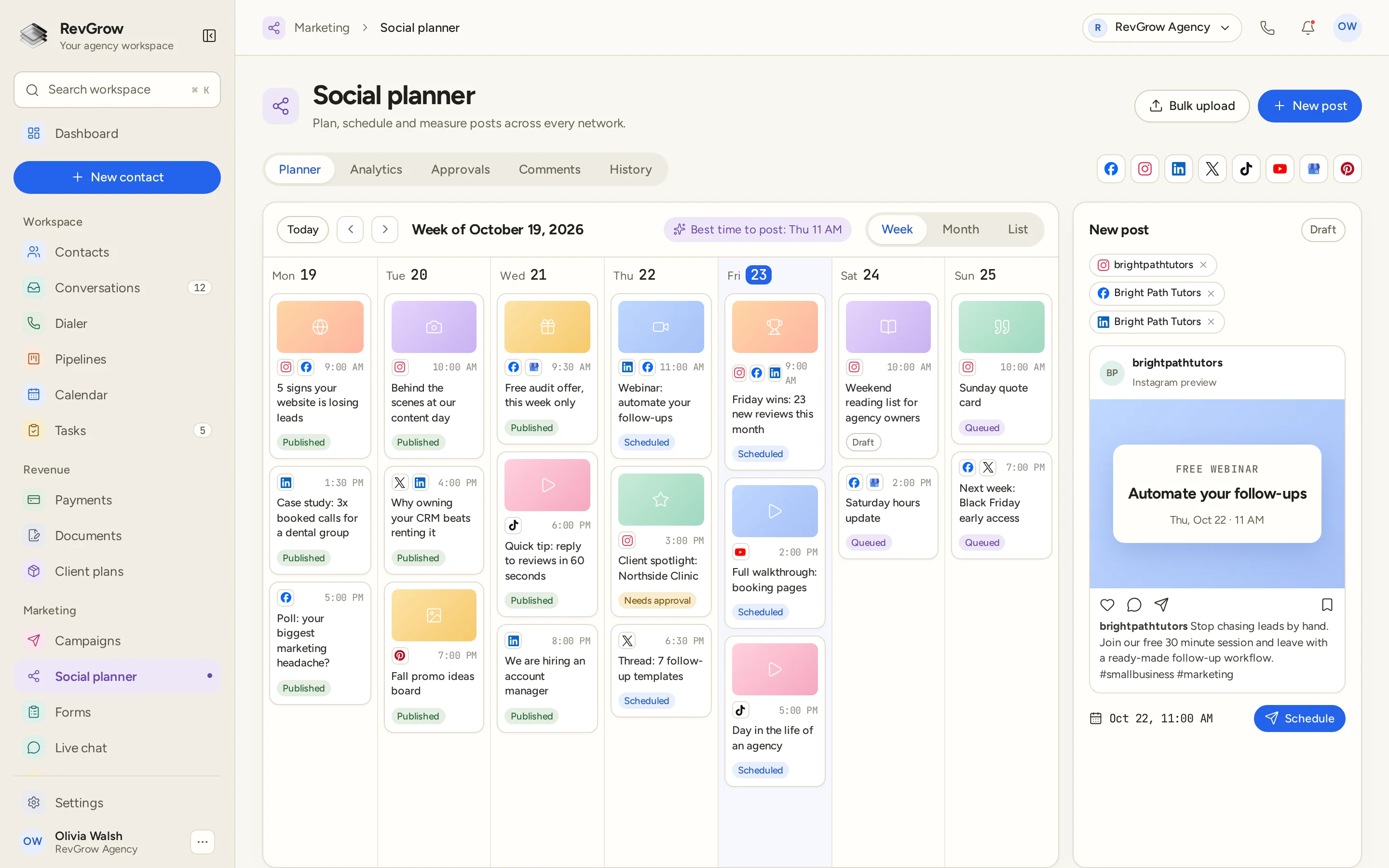
WHAT IT DOES
See the week or the month at a glance, or switch to a list. Drag a post to another day or time and it is rescheduled, with no need to open and edit it.
Write a post once and choose the accounts it goes to. A preview shows how it will look before you schedule it for the date and time you pick.
Add evergreen posts to a queue and let them go out on a repeating schedule, so the calendar stays full between campaign posts.
Comments on your posts come back into RevGrow, so the team can reply from the same workspace instead of logging in to each network.
Send posts for sign-off before they go out. Posts waiting on a decision are marked as needing approval, so nothing is published until it is cleared.
Save sets of hashtags and add them to a post in one step. Bulk upload lets you load many posts at once instead of scheduling them one by one.
Measure how posts perform, and see a suggested best time to post right above the calendar when you plan the next one.
A CLOSER LOOK
Each day lists its posts in time order, with the networks each one goes to. Move between weeks, jump back to today, or switch to the month or list view.
Posts are marked published, scheduled, queued, draft or needs approval, so the team can see what is live, what is ready and what is still waiting.
A best time to post suggestion sits above the calendar. The network icons along the top show the accounts connected to this workspace.
The new post panel shows the chosen accounts, a preview of how the post will look on the network, and the date and time it is scheduled for.
HOW IT WORKS
Connect the client's social accounts across Facebook, Instagram, X, LinkedIn, TikTok, YouTube, Pinterest and Google Business.
Write the post, add media and a hashtag group, and choose the accounts. Or load a batch of posts with bulk upload.
Send the post for approval if the client signs off first. It stays marked as needing approval until someone clears it.
Schedule it, drag it to a better slot if plans change, reply to comments as they come in and check the results in analytics.
FOR AGENCIES
Social planner is one module in the CRM you white-label. Each client account has its own connected accounts, calendar and approvals. You set the team and the brand.
Connected social accounts, posts and comments stay inside that client's account. One client's calendar never shows another client's posts.
Use the approval workflow so clients can clear posts before they publish, without email chains or screenshots.
Logo, colors, fonts and domains are yours. Clients plan and approve their social in your platform.
Social planner ships with the other modules. It is not a paid add-on, and there is no per-seat fee to put the team on it.
Already scheduling posts in another CRM? Free migration covers contacts, conversations, pipelines and the rest. Email hamid@revgrow.app with the tool you use today. Keep the old tool running until you are ready.
The calendar stays full. The brand stays yours.
THE REST OF THE PLATFORM
Six channels, one thread per contact, live updates and team assignment.
Explore ↗Block or HTML emails, segmented sends, sequences and deliverability guards.
Explore ↗Review requests, Google review sync, smart routing and replies from one screen.
Explore ↗FAQ
Facebook, Instagram, X, LinkedIn, TikTok, YouTube, Pinterest and Google Business. Connect the accounts in the workspace and choose which ones each post goes to.
Yes. The composer lets you write a post once and send it to several connected accounts. A preview shows how it will look before you schedule it.
Drag it to another day or time on the calendar. Plan in the week or month view, or use the list view to see everything in order.
Yes. Send posts through the approval workflow. A post waiting on sign-off is marked as needing approval and is not published until it is cleared.
Yes. Comments on your posts come back into RevGrow, so the team can manage and reply to them from the same workspace.
Yes. Analytics measure how posts perform, and the planner shows a suggested best time to post above the calendar. Recurring queues and bulk upload help keep the schedule full.
Yes. Social planner is included with the other modules in the one-time licence, with no extra fee to turn it on and no per-seat charge. Your name, logo, colors, fonts and domains are what clients see.
Yes. Free migration covers contacts, conversations, pipelines, workflows, calendars and the rest. Email hamid@revgrow.app with the tool you use today. Keep your current CRM running until you are ready to switch.
YOUR NEXT CHAPTER STARTS HERE
Join the waitlist and lock in the $799 one-time founding price. Pay once, own the code, run every client under your brand.
Founding price for the first 50 only