Drag-and-drop builder
Arrange the fields in a visual builder. Short and long text, email, phone, dropdowns, choice fields, dates, uploads and signatures sit in the field palette, with the selected field settings beside the form.
MODULE 07 / GROW
Build forms and surveys with the fields, steps and logic your process needs. Map answers to the contact record, then start a workflow or add an opportunity when someone submits. Forms and surveys is included in RevGrow, and each client account runs it under your brand.
Join the waitlist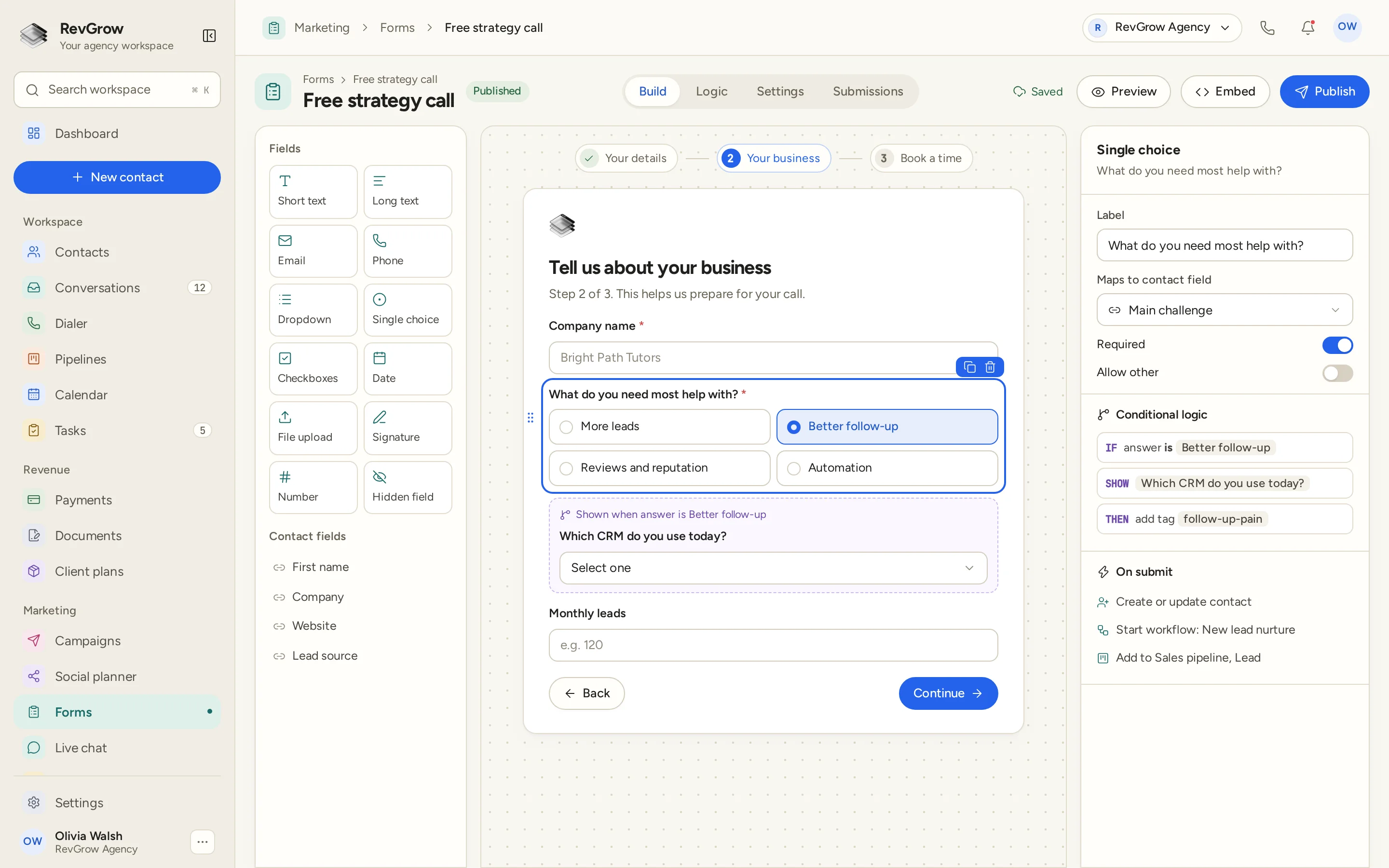
WHAT IT DOES
Arrange the fields in a visual builder. Short and long text, email, phone, dropdowns, choice fields, dates, uploads and signatures sit in the field palette, with the selected field settings beside the form.
Show the next question based on an answer. In the sample, choosing Better follow-up reveals a question about the CRM the person uses today and adds a follow-up-pain tag.
Break a form into a sequence of steps. The sample moves from Your details to Your business and then Book a time, with progress visible above the form and Back and Continue controls below.
Use link parameters to prefill fields when you already have a detail to pass into the form. The person starts with that information in place, rather than typing it again.
Map a question to the contact field where its answer belongs. The sample saves the main challenge to the contact, then creates or updates the person on submission.
Use double opt-in to ask someone to verify their subscription. Keep that extra step in the signup process you set up for the form.
Keep consent for marketing texts separate from consent for transactional messages. Each purpose has its own consent text, so the form can ask for the choices separately.
Collect a signature as part of a submission. A signature field is available in the builder alongside the other fields you use to gather the details.
Add CAPTCHA to the form to help screen automated submissions. Keep that check with the form people fill in before their answers enter the CRM.
Work on a draft, publish the form when it is ready, and archive it when you are finished using it. The state stays with the form so the team can see where it stands.
Review form views and conversion rates to see how the form is being used. Compare visits with submissions when deciding whether the questions or the steps need attention.
Place the form on a website with an embed, or send its link directly. Preview the form before publishing, then use the sharing method that fits the page or conversation.
A CLOSER LOOK
The left panel holds field types and contact fields, including first name, company, website and lead source. The canvas keeps the form itself in view while you arrange the questions.
Your details is complete, Your business is active, and Book a time is next. Company name, the main challenge and monthly leads make up this sample business step.
Better follow-up is selected in the single-choice field. The conditional question asks which CRM the person uses today. The settings panel shows the rule and the tag it adds.
The selected question maps to the Main challenge contact field. On submit, the sample creates or updates the contact, starts New lead nurture and adds the person to the Lead stage of the Sales pipeline.
HOW IT WORKS
Add the questions you need in the visual builder. Map the answers to contact fields, mark required questions and set up separate consent choices where needed.
Group the questions into steps and add conditional logic. Show a follow-up question only when the answer calls for it, and use link parameters for details you can prefill.
Choose what happens when the form is sent. Create or update a contact, start a workflow and add an opportunity to the pipeline, as shown in the sample.
Preview the form, publish it, then embed it on a page or share its link. Return to submissions, views and conversion rates to review how it is being used.
FOR AGENCIES
Forms and surveys is one module in the CRM you white-label. Each client account keeps its own forms and contacts. You set the questions, the follow-up and the brand.
Forms, submissions and the contacts they create stay inside that client account. One client's intake process stays separate from the next client's work.
An answer can update a contact field, and a submission can start the workflow or pipeline handoff. The team works from the details the person supplied.
Logo, colors, fonts and domains are yours. Clients build and manage their forms inside your platform.
Forms and surveys ships with the other modules. It is not a paid add-on, and there is no per-seat fee to put the team on it.
Already collecting answers in another tool? Free migration includes rebuilding forms and surveys with the same fields. Email hamid@revgrow.app with the tool you use today. Keep the old tool running until you are ready.
The answers stay connected. The brand stays yours.
THE REST OF THE PLATFORM
One database for every client, with custom fields, tags, smart lists and clean CSV import and export.
Explore ↗Visual builder with triggers, branches, waits, webhooks and AI steps.
Explore ↗Kanban boards with weighted values, stage rules and stale-deal alerts.
Explore ↗FAQ
Yes. Arrange fields in the drag-and-drop builder, split the form into steps and use conditional logic to show questions based on an answer. The sample shows the current CRM question only when someone selects Better follow-up.
The builder includes short and long text, email, phone, dropdowns, single choice, checkboxes, dates, file uploads, signatures, numbers and hidden fields. Contact fields can also be added, and questions can be marked required.
Yes. Map a question to a contact field so its answer is saved on the record. Submission actions can create or update the contact, start a workflow and add an opportunity to a pipeline. The screenshot shows all three actions on the Free strategy call form.
Yes. Link parameters can prefill fields, and you can embed a form on a page or share a direct link. Preview it before publishing, then use the format that fits where people will find it.
Yes. Forms support double opt-in and separate consent text for marketing and transactional messages. Set the choices for the purposes you need so the person can answer them separately.
Yes. A signature field collects a signature with the submission, and CAPTCHA helps screen automated entries. Review submissions, views and conversion rates, and manage forms through draft, published and archived states.
Yes. Forms and surveys is included with the other modules in the one-time licence, with no extra fee to turn it on and no per-seat charge. Your name, logo, colors, fonts and domains are what clients see, and each client account keeps its own forms and contacts.
Yes. Free migration includes rebuilding forms and surveys with the same fields, along with moving contacts, pipelines, workflows, calendars, conversations and the rest. Email hamid@revgrow.app with the tool you use today. Keep your current CRM running until you are ready to switch.
YOUR NEXT CHAPTER STARTS HERE
Join the waitlist and lock in the $799 one-time founding price. Pay once, own the code, run every client under your brand.
Founding price for the first 50 only