Power dialer with contact queues
Work a list of contacts one at a time. The queue shows who is connected, who reached voicemail, who is calling and who is up next, with progress through the session kept in view.
MODULE 03 / COMMUNICATE
Work a queue of contacts from the browser, or call straight from a record. Keep recordings, transcripts and outcomes with the person you spoke to. Calling and dialer is included in RevGrow, and each client account runs it under your brand.
Join the waitlist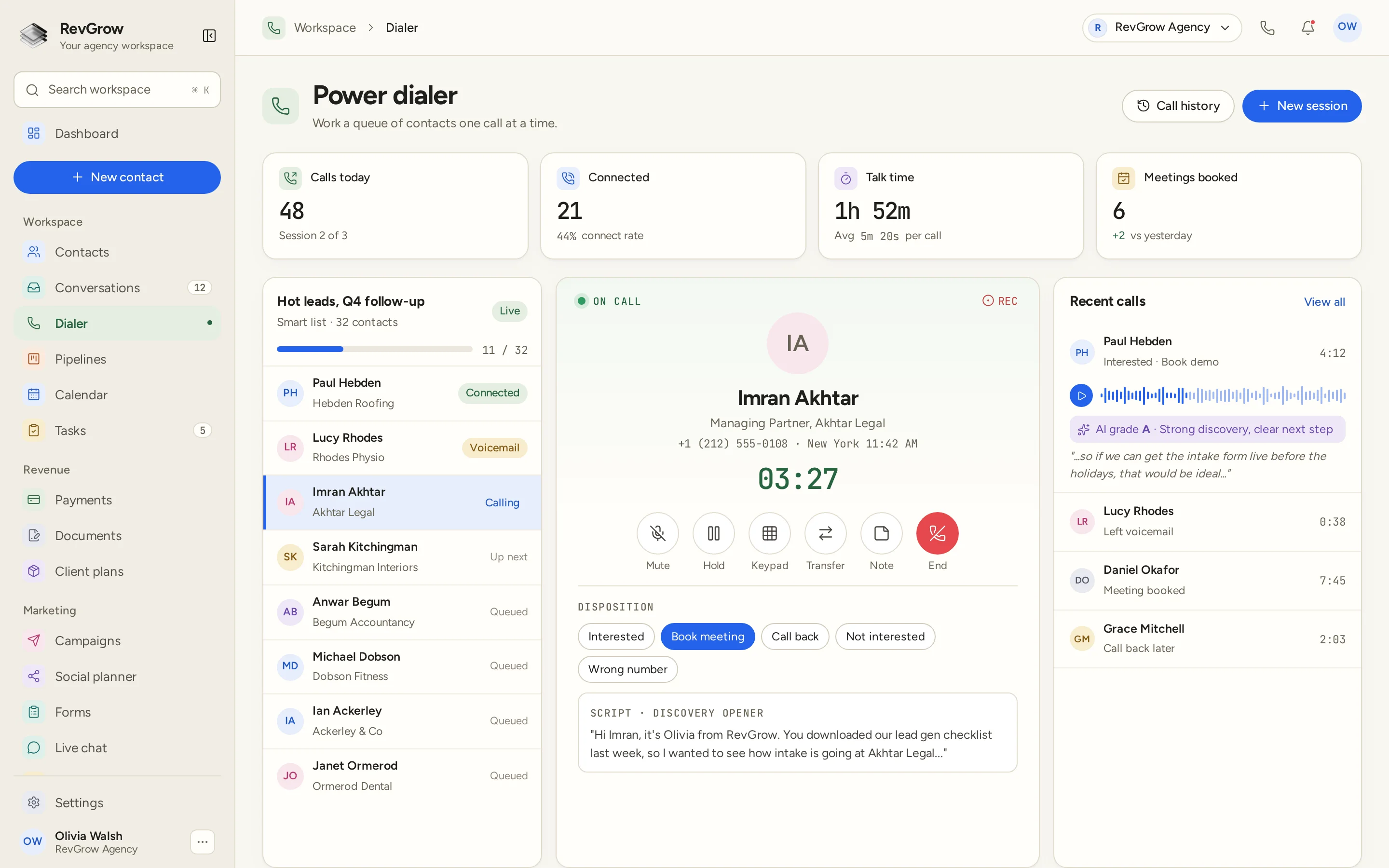
WHAT IT DOES
Work a list of contacts one at a time. The queue shows who is connected, who reached voicemail, who is calling and who is up next, with progress through the session kept in view.
Make and receive calls in the browser. The active call keeps the contact, the timer and the call controls together, so you can work without switching to a separate calling app.
Open a contact and call from the record. The person, their details and the conversation history are already there before you start.
Return to the recording or read the transcript after a call. Both stay with the conversation, so the next person on the account can pick up the context.
Grade calls against the rubric your team uses. The grade sits with the saved call, giving a manager something specific to review alongside the recording and transcript.
The dialer enforces do-not-call entries and calling-hour rules. Keep those rules with the calling setup, so the team does not have to check a separate list before every call.
Spam call screening is part of the calling module. Handle unwanted inbound calls alongside the calls the team needs to answer.
Mark what happened before moving on: interested, a meeting to book, a call back, not interested or a wrong number. Recent calls keep the outcome beside the person.
Inbound calls ring in the browser. The team can take the call from the workspace where it already handles contacts and conversations.
A call belongs in the same conversation as the messages around it. The inbox keeps the call, its recording and its transcript with the contact, rather than in a separate history.
Review calling activity by rep in the call report and leaderboard. Calls made, connected calls and time spent talking give the team a way to review the work.
Set a caller ID for each rep. Outbound calls use the identity configured for that person, while call activity stays tied to the rep who made it.
A CLOSER LOOK
Calls today, connected calls, talk time and meetings booked sit above the dialer. The sample shows the session count, connection rate and average call length beside those totals.
The smart-list queue keeps the name, company and call status on each row. A progress bar shows how far you are through the list, and the active contact stays highlighted.
Name, company, number, location and the call timer stay in the center. Mute, hold, keypad, transfer, note and end-call controls sit below, with the discovery script in reach.
Choose the disposition under the call controls. Recent calls show the person, the outcome and the duration. A saved call can also show its recording, a transcript excerpt and an AI grade.
HOW IT WORKS
Connect your Twilio or Telnyx account and configure the numbers the team will use. Set each rep's caller ID and the calling-hour and do-not-call rules.
Start a dialer session with a queue of contacts, or call straight from a contact record. The queue keeps the current person and the next contact in view.
Call from the browser with the contact and script beside the controls. Take a note, use the keypad, hold or transfer the call when the conversation needs it.
Choose a disposition, then keep the call with the contact's conversation. Return to recordings, transcripts and AI grades, and review rep activity in the call report.
FOR AGENCIES
Calling and dialer is one module in the CRM you white-label. Each client account has its own contacts and conversations. You set the calling setup, the team and the brand.
Contacts, calls and conversation history stay inside that client's account. One team's calling work does not appear in another client's workspace.
Connect Twilio or Telnyx on accounts you own. Configure the calling numbers and rep caller IDs for the team that will use them.
Logo, colors, fonts and domains are yours. Clients work in your platform, including the dialer and the call history they return to every day.
Calling and dialer ships with the other modules. It is not a paid add-on, and there is no per-seat fee to put the team on it. Phone numbers and call usage are billed by your connected provider.
Already calling from another CRM? Free migration covers contacts, conversations, pipelines and the rest. Email hamid@revgrow.app with the tool you use today. Keep the old tool running until you are ready.
The call stays with the contact. The brand stays yours.
THE REST OF THE PLATFORM
One database for every client, with custom fields, tags, smart lists and clean CSV import and export.
Explore ↗Six channels, one thread per contact, live updates and team assignment.
Explore ↗Visual builder with triggers, branches, waits, webhooks and AI steps.
Explore ↗FAQ
Yes. Reps can call from the browser or click to call from a contact record, and inbound calls ring in the browser. Connect your own Twilio or Telnyx account and configure the numbers the team will use.
A session works through a queue of contacts one at a time. The list shows the current contact, the next person and the status of calls already worked, such as connected or voicemail. Progress through the queue stays in view beside the active call.
Yes. Calls can have a saved recording and transcript, and AI call grading uses the rubric your team sets. Review the grade alongside the saved call, rather than treating the score as a replacement for listening to the conversation.
Yes. The dialer enforces do-not-call entries and calling-hour rules configured in the calling setup. Spam call screening is also included for inbound calls.
The active call has mute, hold, keypad, transfer, note and end-call controls, with a script below. Mark the outcome with a disposition, such as interested, call back, not interested or wrong number. Set a caller ID per rep, and review rep activity in the call report and leaderboard.
Yes. Calls thread into the same conversation as the contact's email, texts and other messages. Saved recordings and transcripts stay with that conversation, so the next person on the account can see the context.
Yes. Calling and dialer is included with the other modules in the one-time licence, with no extra fee to turn it on and no per-seat charge. Your name, logo, colors, fonts and domains are what clients see. Phone numbers and call usage are billed by the provider account you connect.
Yes. Free migration covers contacts, conversations, pipelines, workflows, calendars and the rest. Email hamid@revgrow.app with the tool you use today. Keep your current CRM running until you are ready to switch.
YOUR NEXT CHAPTER STARTS HERE
Join the waitlist and lock in the $799 one-time founding price. Pay once, own the code, run every client under your brand.
Founding price for the first 50 only