Live ads and GA4 views
Review live advertising and GA4 views alongside the CRM reporting. Keep the traffic and campaign activity in reach when you are reviewing what happened after a lead arrived.
MODULE 11 / OPERATE
Review contacts, opportunities, conversations and revenue from one reporting workspace. Look at one client or the agency as a whole, then move into pipeline, audience, ads, SEO or calls. Reporting is included in RevGrow, and each client account runs it under your brand.
Join the waitlist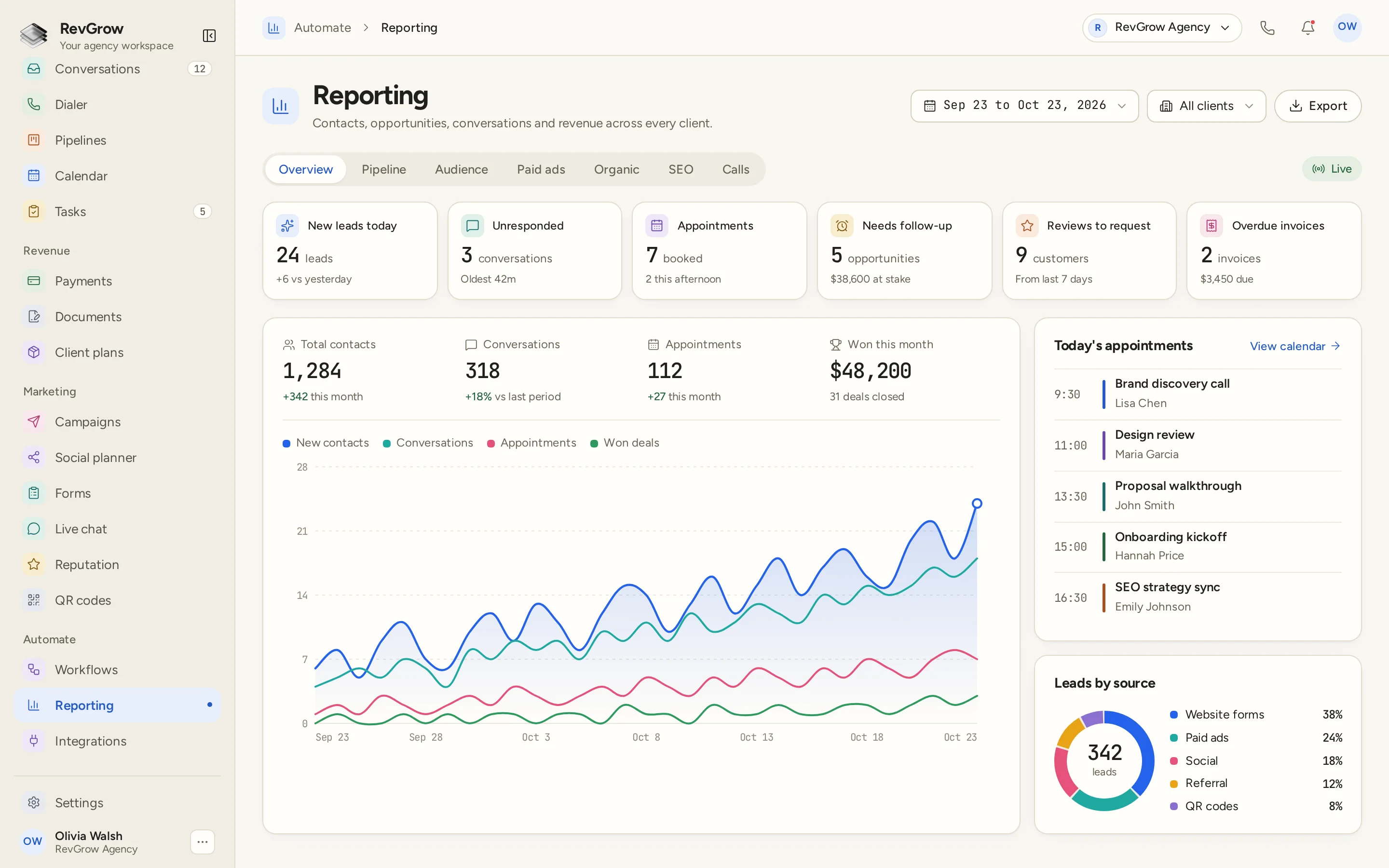
WHAT IT DOES
Review live advertising and GA4 views alongside the CRM reporting. Keep the traffic and campaign activity in reach when you are reviewing what happened after a lead arrived.
See revenue tied to the source that earned it. Bring the outcome into the same review as the lead source, so the conversation can follow the work from acquisition to revenue.
Review the pipeline and its revenue forecast in Reporting. Keep open opportunities and expected revenue in view when you are planning the next period with a client.
Read the current picture of contacts, opportunities, conversations and revenue in live dashboards. The overview brings the activity totals and the work needing attention onto the same screen.
Use the local SEO view when search is part of the client work. Review that part of the account alongside the pipeline, audience, advertising and call reports.
Review calls from the reporting workspace. Keep calling activity in the same review as the contacts, conversations and opportunities the team is working.
Choose one client for a focused review, or use the agency-wide rollup for the broader picture. The client selector stays beside the date range so you can see the scope of the report.
Export reporting data when you need to take it into a client review or work with it outside the dashboard. The Export action sits beside the period and client controls.
A CLOSER LOOK
The header keeps a date range, an All clients selector and Export together. Overview, Pipeline, Audience, Paid ads, Organic, SEO and Calls sit in the tab row, with a Live indicator beside them.
The top cards separate new leads, unresponded conversations, appointments, opportunities needing follow-up, reviews to request and overdue invoices. Counts and supporting details keep the next action visible.
Total contacts, conversations, appointments and won business sit above the chart. Colored lines track new contacts, conversations, appointments and won deals through the selected period. The figures shown belong to this sample dashboard.
Today's appointments lists each time, meeting and contact, with a link back to the calendar. Leads by source separates website forms, paid ads, social, referrals and QR codes in a chart beside its legend.
HOW IT WORKS
Use the CRM records and connect the sources you want to report on, including advertising and GA4. Keep the client work in the account it belongs to.
Select the client you are reviewing or the agency-wide view, then set the date range. Start with the overview to see the activity totals and work needing attention.
Move into pipeline, audience, paid ads, organic, SEO or calls for the part of the account you want to review. Follow the source through to revenue when evaluating the result.
Use the report to decide what the team should work on next. Return to the related client activity, or export the report when you need it for a review outside the workspace.
FOR AGENCIES
Reporting is one module in the CRM you white-label. Review an individual client account or the agency-wide rollup from the same reporting workspace. You set the client setup and the brand.
Focus the report on one client when you need to review their activity. Keep the selected client and date range in view as you work through the reports.
Use the broader view when you need to review activity across the agency. The same workspace lets you move between a single client and the combined picture.
Logo, colors, fonts and domains are yours. Clients review their dashboards inside your platform, alongside the CRM work those reports describe.
Reporting ships with the other modules. Pipeline, revenue and activity reporting sit in the same platform as the contacts and conversations behind them.
Already working from another CRM? Free migration covers contacts, pipelines, workflows, calendars, conversations and the rest. Email hamid@revgrow.app with the tool you use today. Keep the old tool running until you are ready.
The reporting stays connected. The brand stays yours.
THE REST OF THE PLATFORM
FAQ
Yes. Reporting includes per-client views and agency-wide rollups. Choose the client scope beside the date range to review an individual account or the broader agency picture.
The overview covers contacts, opportunities, conversations and revenue. The sample also shows daily action cards, appointment totals, a trend chart, today's appointments and leads by source. Its figures are sample data, rather than promised results.
Yes. Reporting includes live ads and GA4 views. Paid ads, Organic and Audience sit alongside the other report areas, so you can review acquisition activity in the same workspace as the CRM results.
Yes. Reporting ties revenue to the source that earned it. Use that view to follow the outcome alongside acquisition activity, rather than stopping the review at the number of leads.
Yes. Pipeline reporting includes a revenue forecast. Review open opportunities and the forecast when discussing the work ahead, alongside the revenue already won.
Yes. Local SEO and call reporting are included. SEO and Calls have their own report areas alongside the pipeline, audience, advertising and organic views.
Yes. Set the reporting period with the date selector and choose the client scope beside it. Export lets you take reporting data out of the dashboard for a client review or further work.
Yes. Reporting is included with the other modules under your name, logo, colors, fonts and domains. Client dashboards live inside your platform, with per-client views and an agency-wide rollup available for reviewing the work.
YOUR NEXT CHAPTER STARTS HERE
Join the waitlist and lock in the $799 one-time founding price. Pay once, own the code, run every client under your brand.
Founding price for the first 50 only